• Print
  • September 12th, 2005
  • 311 Comments »
  • Design

Why I switched to Firefox

It’s a sad day and a good day. For years I’ve held onto my IE install out of love. I worked on IE 1.0 thru 5.0, and was one of the people that designed much of its UI. But my love for the past has faded. Last week I switched to Firefox: and I’ve been happy.

Why I switched:

  1. IE is a ghetto. There are specs I wrote for UI features in 1998 that are unchanged today, 7 years later, in a world where browser usage has changed dramatically. I’ve watched bugs that I fought to have fixed in 5.0 become regressions, appearing in 5.01 and surviving in 6.0. Even though it’s the product I was proudest of, using it now makes me sad – it’s been left behind. I do read the IE blog now and again – smart folks are working – but there’s nothing for me to install.
  2. Bookmarks work. The Favorites UI model in IE is the same one we built in 1997, when we knew most of our users had 20-40 favorites. It was made to be super simple and consumer friendly as most of the population was still new to the net. This UI is effectively broken today, designed for people that don’t exist. The Favorites menu and Favorites bar show links in different orders, the organize favorites dialog is just weird, multiselect doesn’t work: favorites is a sad forgotten place. This was by far my greatest frustration with IE, even though I’m responsible for much of the original design.
  3. Firefox has quality & polish. IE 5.0, for its time (1999), was a high quality release. Really, it was. Joe Peterson, Hadi Partovi and Chris Jones fought hard to give the team time to do lots of fit and finish work. We did fewer features and focused hard on quality and refinement. Firefox feels to me like what IE 6.0 should have been (or what i expected it to be after I left the team in ‘99). It picked a few spots to build new features (tabs), focused on quality and refinement, and paid attention to making the things used most, work best. The core UI design is very similiar to IE5: History/Favorites bars, progress UI, toolbars, but its all smooth, reliable and clean.
  4. They made a mainstream product. One of the big challenges in designing software is balancing the requests of earlier adopters in the community, with the needs of the majority of more mainstream users. After playing with mozilla on and off I was afraid firefox would be a built for programmers by programmers type experience. It’s not. I don’t know who in the firefox org was the gatekeeper on features and UI, but I’d like to meet him/her/them (seriously). They did a great job of keeping the user experience focused on the core tasks. If you’re reading please say hi.
  5. Security isn’t annoying. . The press makes security into such a huge deal, but I’ll be honest. I don’t want to think about security at all. I’ll do what I need to, but mostly I want the system to take care of it and stay out my face. Nothing in FF makes me feel safer explicitly, I just don’t deal with as many warnings, settings and other details. I know from the PR that security in FF is better (even if only because it’s less targeted by spyware, etc.) but I’m pleased that the product doesn’t remind me of how safe I am all the time.

Problems with Firefox:

I’m a UI design guy, so many of these are UI related. (Added note: I’d used FF on and off, but since I’m now 100% some of these are complaints might fade in a month of usage. Stay tuned).

  1. Find UI. Why does the find dialog appear at the bottom of the screen? I agree that a dialog box (semi-modal) can be a mistake if you’re doing multiple searches, but flipping a coin for placement (top vs. bottom), the top is a better choice for any UI, especially if it’s going to look and act like a toolbar. I can’t move it so it earns a spot on this list. However, the overall implementation isn’t circa 1992 like the IE one. It highlights, it searches on type, & it warns on unfound items – nice..Firefox find
  2. Download UI. Here’s a case where modeless makes sense (it’s never my primary user task), but here we get a dialog box. My first crack at this would be a one line toolbar, much like the find bar, at the bottom of the screen telling me about downloads. That’s where all the other dl status info goes. Again, despite my nits, it’s an improvement on the ancient IE implementation (which we all hated forever too).
  3. Tabs and new windows. Firefox goes against IE behavior and starts each browser instance from scratch. IE intentionally brings the browser history into the new window: the bet being that users who want to continue from where they left off can, and those that want to go their home page can do that with one click. Everytime I hit Cntr-T and see a blank screen I think I’m in Word. I use tabs less often than I expected: opening new windows is often more comfortable – easier to track which window lives where. With multiple tabs (I find) the back/forward behavior becomes complex and hard to predict. Strict UI logic would put the tab UI above the toolbars, not below, but that creates other problems.
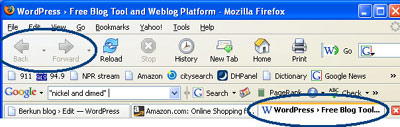
    Firefox tabs
  4. Tabs and modality. The desired illusion of tabs should be to make each tab a virtual browser. Well this breaks when you bring up a modal dialog within a tab: you can’t switch to another tab. It’s an annoyance, not a sin, but when it happens it reinforces my new window habit, and slaps my wrist on my growing New tab habit.
  5. The return of the go menu. It was with great pride that we killed the go menu in IE 5.0. It was the stupidest menu I’d ever seen, since it was never used and no one knew what it did. For accessibility it was necessary, but had no rights to be a top level menu (IE has View.Go). The Go menu was probably inherited from NSCP/mozilla, but it really should be put out to pasture. And if it stays, someone needs to explain why it shows a different history list than the one in the back button drop down.

For reference: I wrote about principles of browser design here: How to build a better browser.

(Update: I’ve responded to many of the comments in a second post.)


Leave a Comment / What do you think?

Your email is never published nor shared (comments policy).

311 Responses

  • Vlad Zachary - September 13, 2005 at 11:31 am
  • I have a question about FF. On my PC FF runs slower than the IE and I have the feeling some of the Windows updates or something in the OS is causing this. Is this possible and how do I find any evidence or am I way off?
    Thanks


  • dj - September 13, 2005 at 2:09 pm
  • Download UI:…My first crack at this would be a one line toolbar…

    You might be interested in the Download Statusbar extension for Firefox – it’s been doing this very thing for several years now.
    http://downloadstatusbar.mozdev.org/


  • xpm - September 13, 2005 at 2:19 pm
  • I have to disagree about new tab behaviour : the thing I absolutely hate the most about IE is the way it brings the previous context over. I *NEVER* want this to happen – I only open a new window/tab if I want to put something new in it. It is that simple.


  • Scott (admin) - September 13, 2005 at 3:09 pm
  • Sorry Vlad – You’ll have to head over to mozilla.org for questions about FF perf issues.


  • Scott (admin) - September 13, 2005 at 3:10 pm
  • dj: good tip. Ill check it out. Looks pretty close to what I was thinking of.


  • Scott (admin) - September 13, 2005 at 3:19 pm
  • Xpm: I understand that’s what you expect or want, but that doesn’t mean that that’s what most or even some of the entire population would expect or want.

    My recollection is that we knew it would be polarized: either choice would have a large % of people that wanted us to go the other way. Some decisions are like that.

    The logic was: if we bring the history along, people who didn’t want it can just do whatever they were going to do anyway – low impact (the perf profile was good). But for people that need it, it’s there. We felt it’s a bad idea generally speaking to leave people in most read/only software with blank screens. It should at least put you on the start page as it does when you launch FF.


  • anon - September 13, 2005 at 4:25 pm
  • “inheretted” … ??
    *ahem*
    inherited
    :)


  • Scott (admin) - September 13, 2005 at 4:32 pm
  • Whoops. Nice catch – fixed now.


  • Alan Trick - September 14, 2005 at 4:07 am
  • If you want anybody to do something about those ideas, you should head over to bugzilla.mozilla.org and file a bug report (make sure you search though to avoid duplicates). I like some of your ideas (and some I don’t, but they would be good options).


  • Kris Silver - September 14, 2005 at 5:47 am
  • Nice article, thanks for being so honest and open, very interesting and educating Scott!

    The Find UI is being worked on quite heavily I believe, Ive seen it in development plans! Personally, to me its logical its at the bottom, as when you click next and are working your way DOWN the page in terms of the words your finding, it makes more sense to have the bar at the bottom, then at the top.

    There is an extension/s for this though, which certainly the one I’m about to link ALL IN ONE SEARCHBAR, adds the SEARCH on Page function to the top right search bar, and is very customizable. https://addons.mozilla.org/extensions/moreinfo.php?application=firefox&category=Search%20Tools&numpg=10&id=377

    The download UI, again being worked on, it works best for best, and is basic. You can make the changed you speak of in the extension dj links to above which he seems to make.

    On tabs, again improved in forthcoming Fx 1.5! You can clearly configure the behaviour you want with tab extensions such as Tab Browser Preferences, and Tab Mix, found in the Tab section of Mozilla Update > Firefox > Extensions – https://addons.mozilla.org/extensions/showlist.php?application=firefox&category=Tabbed%20Browsing&numpg=10&pageid=4

    Also, I’d recommend looking into a lot of other extensions, utilities and add ons which will mimick any feature, setting, and behaviour you desire. I favourite of mine is ALL IN ONE SIDEBAR, found here: https://addons.mozilla.org/extensions/moreinfo.php?application=firefox&category=Navigation&numpg=10&id=1027

    Another is Firetune which will speed up performance and make other improvements and tweaks http://www.totalidea.com/freestuff4.htm

    Also, Mozilla Update is also being worked on and improved by Rebron an admin at SpreadFirefox.com, btw I’m working on upgrades to that site with many others, so all together there’s a hell of a lot of improvements in spoken area’s.


  • BoBB - September 14, 2005 at 7:09 am
  • I recomend you check out the TabBrowser Extensions at http://piro.sakura.ne.jp/xul/tabextensions/index.html.en … They will allow you to set it so that when you open a new tab it will load either your home page, a blank page, or the same page as the current tab.

    This is the beauty of Firefox, if theres a feature you want, most likely someone else has wanted it too and wrote an extension for it, and if not, you can always write your own extension :)


  • Simplex - September 14, 2005 at 9:55 am
  • Ben Goodger is the self-proclaimed UI Czar for Firefox. He’s at the forefront of the people responsible for UI leadership and calming the early-adopter outcry for excessive browser bling. He now works for Google.

    He also wrote the Download Manager for Firefox 1.0.

    The Firefox Go menu is global, in that it tracks all pages visited in all windows and in all tabs. I remember reading somewhere that a developer said that it became useful because it is now global. I use it sometimes (yes yes, I understand your point on mainstream use) because I can’t remember which tab I viewed a page in. If I start browsing in a new window in IE, the go menu remembers where I came from, but after browsing around in window 2, the go menu doesn’t notify other windows where I went. In that respect, the IE go menu is kind of useless. I don’t know if that changes your opinion of the menu itself, though.

    Thanks for the really great writeup!


  • Scott (admin) - September 14, 2005 at 10:34 am
  • curious: thx. I posted a response comment over there.

    Alan/Kris/BobBB: cheers for the pointers.

    Simplex: You’re pointing out another conceptual problem with tabs. They fracture the glory of the single back/forward track. I get why they wanted a global history, but introducing it means there are two flavors of history: something that is bound to confuse people. My own response was to ignore the one in the go menu because I couldn’t begin to guess what it was.


  • Charlie Hayes - September 14, 2005 at 10:34 am
  • I use the go menu all the time. It is really nice for when the browser crashes or you accidentilly close the window. I can quickly load something from the histry without opening the bloated and slow history winodow. And when I want the history window, its right there in the go menu, and not on some silly toolbar icon.


  • ketsugi - September 14, 2005 at 10:37 am
  • You raise some good points with your list of FF annoyances, but I’ve come to learn that there is nearly *nothing* that I don’t like about Firefox that can’t be fixed by looking for an appropriate extension. The Download Statusbar extension, for example, which dj mentioned. Various tab-related extensions will probably fix your issues with tabbed browsing (though possibly not the one related to modal dialogs).

    I disagree with your issue with the find bar; I’m very happy with it at the bottom and indeed it feels more intuitive to me to have it at the bottom. However I will agree that for the sake of users it should be a movable bar.

    I also agree with you regarding browser history in new tabs: however when I do want to preserve browser history I simply Duplicate Tab (using Tab Mix, in my case) and then continue browsing. Middle-clicking a link does not preserve history, but then neither does “Open link in new window” in IE. When I do open a new tab via Ctrl-T, it’s because I want to do something new from scratch, and don’t need the current history. So “Duplicate Tab” might be what you’re looking for.


  • n - September 14, 2005 at 10:37 am
  • “We felt it’s a bad idea generally speaking to leave people in most read/only software with blank screens.”

    Browsers aren’t quite read-only software. In fact, by entering this comment, I am using it to write. Reloading the same page again can be problematic for some web apps. Though I think the best would be to give the user an option in preferences, and don’t load current page in new window by default.


  • florian - September 14, 2005 at 10:46 am
  • i do not agree with your point on the find bat at the bottom. i love it there. perfect spot. about the download window: there are extensions that put downloads in a sidebar, a toolbar, or in a tiny statusbar item (as mentioned by dj). especially for a gui guy firefox has a lot to offer. just look what the community has done! (and a community is something microsoft/ie will never have, only customers.)


  • Lemi4 - September 14, 2005 at 10:48 am
  • reprinted from Asa’s blog

    Berkun wrote:

    Sadly there doesn’t seem to be an open usability community of people volunteering to run usability studies

    Openusability.org; I believe it was inspired by Eric S. Raymond’s essay “The Luxury of Ignorance” (which begat part two, which begat The Art of Unix Usability)

    Maybe you’ll also find talking to ESR to be rewarding. Maybe….


  • JJ Washington - September 14, 2005 at 10:49 am
  • After reading the praises & faults of FF from a MS exec’s mind, I feel inundated with comprehension of why MS has so many problems with customer relations….MS panders down to what they feel the customer should have (based on some kind of research I guess); whereas other companies (to include open source projects) design from the perspective of pushing the user to an even higher level of production. That is the one message that I get from this.

    From the article, I can almost see the author’s condescension of the user. Am I the only one that feels this way?

    -JJ


  • Joe Anderson - September 14, 2005 at 11:02 am
  • I’m sure they’d appreciate you making it friendlier on irc.mozilla.org


  • Code and Coffee - September 14, 2005 at 11:04 am
  • Microsoft Program Manager Switches to FireFox

    Need I say more…


  • Asa Dotzler - September 14, 2005 at 11:10 am
  • JJ, I know it’s difficult for people like us (you and I) to understand how most people use their computers. If you’d sit in on a few dozen usability studies with “regular people” (we’re quite irregular,) you’d realize that it’s not condescension, it’s care. It’s because we care about regular people that we work so hard to make our software work for them. People like you and me can always figure it out, or get an extension, or tweak a pref.

    Most regular people just want things to work. We didn’t do this by dumbing down the application. We did it by making the application even smarter and by making some hard decisions rather than dumping the complexity in the users’ laps.

    With Firefox, we worked really hard so that hopefully the user doesn’t have to. It’s not condescension at all. It’s a passion for users that motivates our drive toward simplicity and making things “just work”.

    - A


  • Hugo Del Castillo - September 14, 2005 at 12:02 pm
  • Just wondering if you evaluted Opera before you switched to Firefox.

    It is my opinion that it is a much better browser than both firefox and IE.


  • Jay Contonio - September 14, 2005 at 12:04 pm
  • I actually hate that IE uses my history when creating a new window. I think it’s the most ridiculous UI decision in the whole app. So now I have to click on the IE icon in my Quick Launch to open a new blank window when ones already open.

    I usually only use IE for web apps that take some time to load, and when I need to open a new window quick waiting for that app to load sucks.

    Firefox doesn’t need to change anything related to this. This is what users are used to and want. Using history makes no sense.


  • Marco Raaphorst - September 14, 2005 at 12:38 pm
  • great story. you’re running mucho open source stuff, wordpress too :) smart thinking. Microsoft needs to follow one day…


  • Ben Goodger - September 14, 2005 at 12:41 pm
  • Hi Scott,

    Good points about tabs/windows and the unreliability of the back button. It seems these days with complex web apps that all too often the back button isn’t there when you want it, and when it is there it doesn’t work like you’d expect. This is something we’ve been thinking about for the past month or so as we take a fresh look at how people navigate the web. Despite what Asa said in his blog post this issue was never actually completely resolved to my satisfaction at least, and I think it’d be worthwhile developing some heuristics for inheriting session history in certain cases and doing some testing on that.

    -Ben


  • neorser - September 14, 2005 at 1:28 pm
  • You can make a tab go to your homepage (first homepage if you have multiple) if you download the Tabbrowser preferences extension. Also you can get the tab bar at the bottom.


  • Corey Allhands - September 14, 2005 at 1:35 pm
  • “Strict UI logic would put the tab UI above the toolbars, not below, but that creates other problems.”

    I have to totally disagree on this one. This is the one thing in the IE7 beta that annoys me to no end. Menus have always been on top and that’s where I like them. And for those who don’t, let us at least change it. Those tabs at the top annoy me, but not being able to move the menus up top is even worse. I want the tabs close to where I am working for a quick click.


  • Crazy_8 - September 14, 2005 at 1:49 pm
  • xpm @ post #3

    I agree, I don’t even want it to come over. If IE7 has that, then they had better have an option to turn it off, or that just re-enforces my use of FF. :)

    Of course, I will probably never go back to IE no matter how many features they add. I just love the idea of ActiveX not even being supported, I really don’t need it at all. :D


  • Jake - September 14, 2005 at 2:22 pm
  • Hey just wanted to comment on the “i don’t use the tabs as much as i should” I had that exact problem moving from IE into this famed world of tabbed browsing until I discovere All in one gestures. Now when i want a new tab i just right click and drag a quick up motion and ‘wala’ there is my new tab. There are tons of them to use but really that is the only one. Also a great feature is to click on links with your clickable scroll button which makes the link open in a new tab. Trust me once you get used to those tabs you will never go back.


  • Alex Bishop - September 14, 2005 at 2:23 pm
  • I seem to remember that the Find bar was at the top of the page area when it was first checked in but was soon moved to the bottom. When it was at the top, it used to shift the page content down when it appeared, which was annoying.


  • Jussi Kukkonen - September 14, 2005 at 2:24 pm
  • There is a reason for the placement of the search bar:
    If it was on top the page content would move up and down as the bar is shown and hidden — this is extremely annoying.


  • Steve - September 14, 2005 at 2:39 pm
  • Corey and others are right.

    The current (Sept. 14th, 2005) implementation of Tabs in IE 7 is beyond rediculous.

    Every app I’ve played with, that features Tabs, does it like Firefox… the Tab is the “handle” for the content directly below it…

    If the tab placement, is at all editable by API/ActiveX (cough) extentions, then I would expect that someone releases the “moveTabBar” extention for IE7 within a week of it shipping.

    “Strict UI logic”… is obviously in need of an overhaul… UI’s have changed significantly over the last decade…

    As for the other comment, about each new tab, not opening the last window/tabs location, I fear you have suffered with the IE design for too long.

    I too, am one of the thousands, that swear at my PC, every time I use IE, and open a new window… only to discover that the last window is re-opening (Like Duh! I already had that window open, that’s why I’m opening a new one!)

    If the last site (IE only of course) spawned popups, they all re-spawn…
    If the last site was a transaction… e.g. my bank transfer to XYZ… OUCH! say goodbye to a bunch of cash…

    I understand, that this was your (or your teams) original design, thus you want to stand behind it… but hey, take the flack… it seemed like a good idea at the time, but in hind sight… not a smooth move…

    (although I do see one advantage… a “Feature” as MS calls it… sites tracking hits, get falsly higher ratings… as it appears that user ‘x’ hit the site twice, rather than user hit it once, then wanted to comparison shop, or check out a reference link)

    A final note on tabs…

    If you do not already have it set up, ensure that middle-clicking (e.g. clicking the wheel), opens the link under the cursor, in a new tab (in the background)…. and middle-clicking on a tab, closes that tab. (this will shave countless seconds off your surfing time)

    ta.


  • Richard - September 14, 2005 at 2:48 pm
  • The key to me about new tabs is the History Trail rather than the Current Page. I’ve lost count of the number of times I’m on a slow non-cacheing website where I don’t want to go “back” because it takes 30 seconds, do 3-4 “Open in New Tab” clicks to see where I want to go next (looking at related products, whatever), then close off the other tabs and keep going. Great, fantastic, nifty use of tabs. Then I change my mind, or want to go back to the previous store, hit “Back,” and realize that I’ve closed off all of my history.

    Why not use the current model for new tabs (blank page) but, on all new tabs (with or without content) bring the “Back” history along? No additional network load, no webapp page reloads, if the user doesn’t hit Back it works exactly the same as it does today, but if they do want to go Back then everything still works as expected. I personally can’t see much of a problem there.


  • Ari Finkelman - September 14, 2005 at 3:01 pm
  • My 2 cents. Tabbed browsing is great. But, if you are going to use tabs, do it right. GAIM (http://gaim.sourceforge.net) gets it right. The ability to reorder tabs is a must. And onther feature is the ability to tear a tab out and create a new instance of the app.

    Another beef with FF is the close tab button. I have an extension that puts the X on each tab. A must. You cant cntrl-click tabs to select for multiple closures.

    And yes the All-In-One-Sidebar is great. As are a lot of extensions I put in FF, but if I, as well as others, think they are so great… shouldnt they be feautures?


  • CircusDog - September 14, 2005 at 3:04 pm
  • Regarding tabs and carrying over the browser history: My most-often way of opening a new tab is by right-clicking on a link and selecting “open link in new tab”. That way, I can continue to read the page I’m on and then hit all the tabs I’ve opened and carry on from there. Using tabs this way gives you much more flexibility than a simple back-next button. It gives you more of a tree structure instead of a single page history.


  • Rick - September 14, 2005 at 3:04 pm
  • The tab preferences problem could be easily solved…even on a per user basis if needed. Most OS’s have a specific user login. The first time a new tab is asked for bring up a dialogue box asking how you want the new tab to be handled….bring the history from the linking location or start fresh.


  • Joe Clark - September 14, 2005 at 3:15 pm
  • I’d be willing to support your complaint that browser history is not copied over to new tabs if and only if you renounced forever IE/Win’s habit of loading your *current* document into a *new* window.

    When you start a new word-processing document, do you get the previous document you worked on?

    When you write your friend a letter, do you include the letter he or she sent you first?

    When you borrow a new book from the library, do you get all your old books too?

    “New” means “new blank document,” not “clone.”


  • David Cameron - September 14, 2005 at 3:23 pm
  • “The Favorites menu and Favorites bar show links in different orders…”

    I noticed this one some years ago and was going to submit a bug report to Microsoft. I gave up when the only suggested way to submit a bug report was to send an email to ms-wish@microsoft.com. Was this by design? If so why? It certainly was rather strange.


  • frustrated ie user - September 14, 2005 at 3:24 pm
  • “I want the system to take of it and stay out my face”

    should probably be “take _care_ of”, right?

    (Another gripe: IE ate my form data when i had to go back to fix this form. Firefox never does this.)


  • Dug - September 14, 2005 at 3:35 pm
  • Ari, I agree and had the same problem till i learnt about middle clicking a tab – it closes it. Also, you could try this little extension; https://addons.mozilla.org/extensions/moreinfo.php?id=785

    Thanks to Jake, I’m going to go and play (and hopefully learn) Mouse gestures :D

    The only two problems I’ve had with Firefox are that alerts & password dialogs are window-modal, and a very annoying one that Ctrl+W closes a tab when it does ‘Find’ in pico (nano) in linux, annoys the hell out of me! I’m just glad I have UndoCloseTab. :)

    Don’t suppose anyone knows how to change KeyBindings in FF without resorting to editing jar files? I’ll get round to it at some point!

    Certaintly some good ideas on here, I especially liked Ari’s points about being able to drag tabs and how Gaim works.

    As a shameless plug (it is my site!) I’ve got a little list of some of my favourite Extensions (like most people seem to!) at derp.co.uk – its just a simple wiki of various tips and tricks for Windows, FF and Linux really, stuff that I keep forgetting really I guess!

    Personally, I’ve tried IE7 at work and I’ve absolutely hated it. I don’t like the allow and deny sites dialog, and putting the tabs at the top of the page is just a nightmare for my wrist!

    Still, some fantastic work coming from the Firefox team and I’m sure like most people I want to thank Scott, and everyone’s who’s replied for giving some valuable insight and a lot to think about, especially in UI design.

    eek ook ook OOOK OOOK! Thanks!

    Dug (a random visitor… how did I get here actually! Damn FF history!… ;D)


  • Peter - September 14, 2005 at 4:11 pm
  • I just read an interesting blog about Vista UI here:

    http://applexnet.com/index.php?name=News&file=article&sid=1591

    Why does Microsoft allow the user experience to stagnate? Microsoft does have a lot of money. They should be able to invest in the research and development of great and innovative products. How can Mozilla outdo Microsoft? What is Microsoft doing wrong?


  • Dev Null - September 14, 2005 at 5:09 pm
  • I agree about the download dialog. It’s friggin retarded. I hate it. It’s the one of the biggest reasons I don’t use FF.


  • Nikolay Kolev - September 14, 2005 at 5:17 pm
  • I like Firefox a lot, but it’s just times slower downloading and rendering images. This is my only thing I can’t ignore.


  • Paul Franz - September 14, 2005 at 5:37 pm
  • I think the find is at the bottom as a throwback to vi and similar. Just like ctrl-f you can press / to type. Another reason not to put it at the top is, i dont care about the find window. Usually, you know what you’re typing (it’s usually short for a find), and I’m more concerned with what I’m searching for (in the document), not the find dialogue.

    It may be personal, I also really like the way tabs open behind. Links often come up in the middle of a document, and pages take time to load. So I usually have it load in the background while I find a stopping point in my current document. Or, if there’s a list of links I want to visit, I can open all of those at the same time and jump along the tabs.

    Thanks for the post, it was quite interesting to hear a critique from someone who knows about designing web browsers and can properly contrast ff and ie.


  • Oiaohm - September 14, 2005 at 5:52 pm
  • Download dialog Ok have not seen it in ok 2 years. Reason Download Manager. Kinda fixs that problem.

    History not being carried from tab to tab is a secuirty thing so you have to live with it.

    Go menu Its history but is is also Handy when some one hides the tool bars and leave you with just the menu. Yes it needs a better name but Go has kinda stuck.

    I hope you know that you can completely reskin Firefox. I do mean completely. So you can make a them with the Find bar up the top the Go menu gone. Reason I know is restricted computer setups Browser only loaded to one site and you don’t want to let them anywhere else. Yep I removed the menus completely striped out the location bar and left them with tabs and forwards and backward and a home button. Its nice.

    Since you are a developer It would be nice to see a theme skin of what you think firefox should look like. Dont worry Firefox has a backup plan firefox –profile Can fix the most evil stuff ups ever included my first attempt home page load no mouse no keys yep no browser. Still backup first.

    The Dilog box problem sticks to stop user conusing over windows and stoping windows form geting losts. Close ie to fine 60 windows in back ground. not nice.


  • Robert Olson - September 14, 2005 at 8:55 pm
  • I totally agree with you on the go menu thing. I have always hated that drop down menu and likewise never understood what determined what sites were listed there. The thing the pissed me off the most was I could never find how to remove sites from there (I’m not going to deny it, I used to visit so sites I’m not particularly proud of).


  • Adam - September 14, 2005 at 11:53 pm
  • Nice to see another conversion from IE to FF :)

    Truth be told, however, I remember when IE 5 was the best browser around. I was one of the Netscape 4 hold-outs who just wouldn’t leave Netscape but finally had to because it was beoming unsable. (Plus it was slow as hell).

    Honestly, though, my biggest complaint with FireFox isn’t anything you mentioned… It’s the fact that on our corporate LAN (yes, we have FireFox on our machines at work (somewhat thanks to my talking the IT guy into it)) I still have to use IE to check my e-mail because Outlook Web Access is not very FF friendly. (I can’t just set up Outlook since I don’t have my own desk and float between computers in the control room / master control)

    As for the tab issue… I have Tab Browser preferences set to put it at the bottom. It works out nicely that way (and of course on my computers at work confuses the hell out of me ’cause it’s at the top)

    One reccomendation (I apologize if it’s been suggested already… I was kind of at work when this got Dugg), check out the Mozilla.org extentions gallery. Lot’s of extentions you’ll probably never need but there are some real gems in the bunch.

    -A


  • Jerry - September 15, 2005 at 12:33 am
  • For those of you who want to move tabs around and don’t have the new Firefox 1.5B1 (it’s built in now from this extension), look for the extension called “miniT” that will allow you to move your tabs to where you want.

    Also, I find the Tab Clicking Options to be handy for me. I can double-click on a tab to close it. I tried the extension that put an X on the tabs but I found it annoying, especially when I misclick.

    Sessionsaver .2 is nice also, especially when it reloads tabs from a crash. Doesn’t seem to work too well in FF 1.5B1 too well, but it’s better than nothing since I always have quite a few tabs open.


  • SirPsycho - September 15, 2005 at 2:03 am
  • Yes MiniT does allow you to reorder tabs. Good that’s in FF 1.5.
    Do not use Tab Browser Extensions, it just slow down FF too much. Tab Browser Preference is faster, but with a lot more functions. The one i miss is making links open just after the active tab. Maybe it can be done in core FF ?

    I think the thing with back/forward and tabs is a false problem.

    I like the new search bar. I would love to see all occurences highlighted in the page. Of course with a different color than the “active” occurence.

    Oh yeah, i HATED IE so much when it loaded the current page on a “new page” ! Never do that again :)

    I’ve just discovered the “go menu”. I never noticed and openes it before !

    FF is great, can’t wait to see it better :)


  • Ptorgi - September 15, 2005 at 2:35 am
  • Going back to the issue of the “Go” menu… I had never used it before, and I was only vaguely aware of its existence until reading this very page – but it has just come in unexpectedly handy when I accidentally closed the tab I was reading this blog on. I’m converted now.


  • Bob Welker - September 15, 2005 at 3:24 am
  • Changed over to FireFox as primary browser a couple months back, and, except that I find it’s DL manager crude, I’m favorably impressed.

    Find UI – strange at first, but find I like it where it is (and not tempted to move it elsewhere).

    New tab as blank – Major draw (for me) to use FF. I can understand why cloning the current URL into a new window might have been seen as advantageous when net access was a novel thing to most users, but is, in my opinion, an example of “welding the training wheels on”, and often causes more problems than it solves. Drove me nuts in IE, especially if the current window’s URL was some bloated thing that took a year to load.

    Options go to the user – in FF, if you don’t like what it’s doing you can (usually) find a way to make it work the way you want. IE – not so much.

    My take on the situation may be wrong, but I’ve long had the impression several changes made in IE4 and higher had more to do with melding the browser into the OS, and often to the detriment of simplicity.

    For example, I maintain a simple web site for our maintenance department that is mostly a storehouse of links to vendor documentation, and in-house generated DOC, XLS, and other files containing troubleshooting field reports and the like.

    In up to IE3 clicking on, for instance, an XLS link loaded a copy of Excel, and the user had full printing capability. In IE4 and later the file is rendered in such a way so printing capability downgrades to what IE can do, and completely hoses the functionality I was trying to provide.

    While I can see where this might be a good thing (if the user didn’t already have a program capable of handling XLS files installed) it didn’t do me any favors. BTW – if someone knows of a good way to revert to the pre-IE4 behavior I’m all ears … I troubleshoot and fix machines, and am not a web author per se.


  • Greg R. - September 15, 2005 at 4:18 am
  • #3 on your list of complaints about Firefox was my major frustration with IE, and one of the things I like *best* about Firefox.

    You wrote “IE intentionally brings the browser history into the new window: the bet being that users who want to continue from where they left off can, and those that want to go their home page can do that with one click.”

    Well, you lost that bet! :-) At least with this user.

    I generate a new tab (or window) precisely because I do NOT want to continue from where they left off. Most frequently, I’m using tabs as a process queue — as a list of Things To Do or Read. For example, as I browse my RSS subscriptions in Bloglines, I open interesting links in new tabs in the background to review later. That way I can read through all of my feeds, then come back and review those interesting links. If I’m opening a new tab, 99% of the time it’s because I’m beginning a new thought process or line of investigation, not because I’m continuing an old one.

    Anyway, the great thing about Firefox is with a simple extension you can have it both ways. Just install the Duplicate Tab extension. With that extension, adding a shift to the shortcut duplicates IE behavior. So SHIFT-CTRL-T gets you a new tab w/ all the previously focused tab’s history, etc. SHIFT-CTRL-N does the same thing in a new window (just like IE!).

    Of course, if you like that, you might still complain that the keyboard shortcuts are different than what you’re accustomed to. So what? Don’t fret the difference; install the Keconfig extension. If you don’t like ‘em, you can use the Keyconfig to remap keyboard shortcuts. :-)


  • ithink - September 15, 2005 at 5:15 am
  • finally…fireofox is the choice


  • Astxist - September 15, 2005 at 6:44 am
  • Great article, well done.


  • asddsa - September 15, 2005 at 7:42 am
  • Hi,
    I was wondering if you’ve ever tried Opera! I agree with Hugo Del Castillo, above, completely. Opera has the search button at the top; the tabs are located above the toolbar; and there’s a startup dialog that lets you choose if you want to start with no pages or continue from the previous browsing session. I noticed those were the points you mentioned that were lacking in Firefox but present in Opera.


  • לינמגזין - September 15, 2005 at 8:10 am
  • מנהל הפיתוח של IE לשעבר, מסביר מדוע הוא עבר ל…פיירפוקס

    אכן, זו כותרת קצת מטופשת (צהובה אפילו) לידיעה, אבל לא בכל יום מכריז מנהל הפיתוח של IE (החל בגירסה 1.0 ועד לגירסה 5.0) על חיבתו לפיירפוקס דווקא.


  • aaaaaah - September 15, 2005 at 10:05 am
  • 1,2,3 can be handled with extensions. 5, it’s easy to remove the go button.

    Numer 4 though. YES!! YES!! YES!! I *despise* this aspect of Firefox.


  • steiv - September 15, 2005 at 10:12 am
  • I’d have to agree with XPM- when I hit the ctrl+t, it’s because I want to start at a new place. Put a tab after that and I’m over to the google search box. If I wanted to see the same page (or a variant) I would be scroll wheel clicking instead of left mouse clicking.

    Going to the current page or my startup page is one thing that PISSES me off about Konquerer (in Linspire & Kubuntu). Because instead of typing my next web location, I have to go back to the mouse and highlight the address to change it. This is very annoying, and one reason why I’ve stuck with firefox.

    Good article though- it’s nice to hear insider/rival opinions.


  • Terry - September 15, 2005 at 10:19 am
  • If FF ever changes the tab history behavior as described in the article I will no longer use it. As described it seems quite backwards to me. I should see the history for my current tab not all my tabs. If I need my entire history that’s why the history side bar is there.


  • SuperFreak - September 15, 2005 at 10:20 am
  • “IE intentionally brings the browser history into the new window: the bet being that users who want to continue from where they left off can, and those that want to go their home page can do that with one click.”

    Then IE/Firefox need a preference to control this behavior like Safari has. Safari allows you to set new windows/tabs to open with: Home Page, Empty Page, Same Page, or Bookmarks.

    I’m also a UI guy,and I don’t have Firefox installed because the simply haven’t put forth the effort to refine the UI for OS X.

    Super Freak


  • Slanty Sideways - September 15, 2005 at 10:28 am
  • My main issue with the ‘extensions fix all’ argument is that I use 5 different computers in my day to day life. Two at home and three at work. Now I know it seems a little crazy but thats the environment I’m in. I guess I’m getting tired of having to setup every computer with the right extensions with the right settings. I would love to see a system where I can save off my settings to a file that I could email to myself and import into any firefox browser anywhere. It doesnt seem like it would be that hard to do. Simply save the location needed to download the extension, and have the settings in XML files. That would make Firefox sprantastic.


  • Soo qing - September 15, 2005 at 10:51 am
  • FF is just great! The default install of FF had nothing I wanted to change at all and I hope it will continue to do so!


  • CrazyWingman - September 15, 2005 at 10:53 am
  • I have to completely disagree with you about the location of the search bar. Perhaps the _Windows_ version should put the search bar at the top, but if you’re running something like Linux, and are used to using vi, emacs, and more/less, you expect the search text to be at the bottom of the window. It’s a completely different argument as to whether they (vi/emacs/etc.) got it right, but being as many people have their use ingrained in them, arrogantly throwing out this mode is less than smart.


  • Jason - September 15, 2005 at 10:53 am
  • My opinions..

    1) I hate tabbed browsing, I want each window to open separately, not as a child within a parent window.
    2) I hate enormous toolbars. The toolbar I use for IE has File, Edit, Favorites, Tools, Help, Back, Forward, Stop and the URL location, that’s it. It’s no bigger than the status bar at the bottom of the page.
    3) Pages just don’t look right in FF. The same page looks much prettier in IE.

    It’s not to say that I don’t have gripes about IE, because I have plenty, but none of them are mentioned here. I never use Favorites so I don’t have anything to add there. I like when I hit new window and it opens the existing page. If I remember correcntly, back in the day, Netscape would open with a blank page that wasn’t good for anything. One of my bigger gripes I believe may lie inherently in the Windows code.. Even though I’m on a broadband connection, some pages still load slower than molasses.. so when opening links, I nearly always right click every link of interest and say “open in a new window”.. so many times, the new window that pops open steals the focus from the window I’m still browsing on. (I even have PowerToys installed and have focus-stealing disabled, but it doesn’t matter)

    Lastly, another thing I hate with IE is when you fill out a bunch of fields, hit submit, and let’s say you got “page cannot be displayed”.. when I hit back, I want to see all the fields filled out with what I put, I don’t want to have to enter it all again. I realize this may be JavaScript at work but it’s so fckin annoying.

    Oh and one more. I abbbbbsoluteeeeely hate (it’s again a Javascript thing) when you open a page, say Google for instance, and you do a search, then when the second page loads you realize that you need to modify your search, so you go into the search box, start typing, then all of a sudden the textbox reverts to what you originally had. Being a web developer I LOVE JavaScript, but not for these annoying, inane uses. I can understand setting the focus to a particular text box (which at times can be quite annoying in itself) but resetting the value via javascript, instead of using the text boxes VALUE attribute seems stupid!


  • Boanerge - September 15, 2005 at 11:02 am
  • This is so cool! People having progressive discussion about the software they use. Changes are now dictated from the bottom up and all software (even proprietary like IE) becomes more innovative.

    BTW, does anybody find the similarity of IE’s path to old Netscape ironic?


  • North - September 15, 2005 at 11:04 am
  • Overall FireFox is great.
    I wish FireFox would save web pages with the usually meaningful web page as the default filename rather than the often meaningless serverfilename.htm name as the default save filename.
    A control to quickly switch between the two as the initial save filename would be nice since different sites have different naming conventions.


  • bhavesh patel - September 15, 2005 at 11:11 am
  • Hi, I only agree with #5(Go menu) of your criticisms of Firefox, and strongly disagree with #3 (new windows).

    I absolutely HATE having the old website show up in IE. I always want to start a new stream of thought or searching with a new window. With IE, you’ve got to wait until IE is finished re-downloading and re-rendering before you can type in a new website. If you start typing in the middle of page load, the address bar reverts to the original if you don’t finish before the render.

    Conceptually, I am opening a new window for a new thought.

    Tabbed browsing is awesome…I think you’ll love it after you use it for a while, especially in Windows! It’s nice not having a bunch of half-inch tabs at the bottom of your screen just for the browser.

    Plus, each window with it’s tabs can function as a “project” or container for similar web pages. E.g. Tabs in window 1 might be research on best flight fares, Tabs in window 2 might be research on best hotel fares, tabs in window 3 might be reviews of mp3 players, etc.

    Bhavesh


  • mcic - September 15, 2005 at 11:12 am
  • Enlightening post, especially from a former IE developer. Certainly the clean and simpler IE user interface in 1998/1999 (IE4 and 5) was what made me switch from Netscape 4 to Internet Explorer. Then, IE6 came along, and the pretty Windows XP skin was good – though during Mozilla’s development it was obvious IE was far behind, and Firefox cemented that fact by producing a usable UI. I suppose yes, in a way IE7 addresses some of the flaws with Mozilla Firefox’s UI (particularly placing the tabs towards the top of the screen) – hopefully Mozilla’s team sees and understands them too – but somehow tabs look awful at the top and it’s a pain having to move the pointer to the top of the screen to switch (assuming not using ctrl/command-tab)


  • Barry Staes - September 15, 2005 at 11:13 am
  • I completely agree with Greg R. (5 posts ago)

    New tab should not contain irrelevant history.


  • Anthony - September 15, 2005 at 11:33 am
  • I’m with Hugo and asddsa. Extension this, extension that, clone, duplicate, don’t duplicate, download manager, blah, blah, blah, check for updates, download, restart, this, that…

    Try Opera. Honestly.


  • James Schend - September 15, 2005 at 11:37 am
  • In response to:

    Tabs and modality. The desired illusion of tabs should be to make each tab a virtual browser. Well this breaks when you bring up a modal dialog within a tab: you can’t switch to another tab. It’s an annoyance, not a sin, but when it happens it reinforces my new window habit, and slaps my wrist on my growing New tab habit.

    Firefox has a (hidden) option to enable old-style error pages instead of error dialogs. Since 99% of the time (from my experience) dialogs come up in tabs, they’re error dialogs, I always enable this immediately after sitting down at a Firefox install. I think it should be the default. The error page is better because:

    1) It doesn’t block switching to other tabs.
    2) It has a “reload” button to allow you to attempt to reload the site. This is important because frequently when an error dialog comes up, the URL field is empty and you can’t remember what link you clicked that had the error. (I usually open a site, click 20 links in different tabs… if one of those doesn’t load, which one? The dialog doesn’t say.)

    Safari does dialogs also, but it puts a little marker in the tab that has the error and the dialog doesn’t appear until you click on that tab. It’s a little nicer than Firefox’s method, but still not as good as error pages.


  • James Schend - September 15, 2005 at 11:48 am
  • “I have to totally disagree on this one. This is the one thing in the IE7 beta that annoys me to no end. Menus have always been on top and that’s where I like them. And for those who don’t, let us at least change it. Those tabs at the top annoy me, but not being able to move the menus up top is even worse. I want the tabs close to where I am working for a quick click.”

    The logic is this: Tabs should be self-contained. The “back” button should be *inside* the tab because it only impacts the current tab, not the entire set of tabs. Likewise with the URL field, the search field, Home, Stop, Reload, etc.

    If you see a preferences dialog with a set of tabs, and a “add” button inside the tab and a “add” button outside the tab, you know that the button outside will add a new tab, and the button inside will add a new item in the current tab. Browsing should be the same way.

    In short, I agree: The tab bar should be at the top of the window. Actually, ideally, every OS would be like BeOS, and tabbing windows would be handled by the window manager, so you could tab an email window onto a web browser window, or whatever combination you want.


  • Rob - September 15, 2005 at 11:51 am
  • IE’s ‘new window contains old page’ behaviour is potentially dangerous, in situations where a GET performs an action (I know that to do so is incorrect, but a lot of webapps do so regardless). It’s also… just odd.
    Rob


  • Michael McDougall - September 15, 2005 at 12:04 pm
  • The new-tabs-should-inherit-history debate has been raging for 6 years on Bugzilla. See https://bugzilla.mozilla.org/show_bug.cgi?id=18808

    It’s the one thing I missed when I switched from IE, but years ago I gave up hope of having it implemented in Mozilla (and then Firefox).

    Michael


  • Matt Z - September 15, 2005 at 12:07 pm
  • One of the things with the Tabbed viewing that I have to disagree with you on, is its ease of use. The ability to open and close tabs by using the center mouse button on a link has been one of the most efficient tools I have found in FF.


  • Tim Almond - September 15, 2005 at 12:11 pm
  • I hadn’t really thought about it before, but you have a point about the download manager. It would be better as some sort of line at the top where you could get more detail as required.

    I don’t agree about Find, though. I took to Find like a duck to water. I liked it a lot.

    As for security, it’s the little things. That an exe requires two stages (download, then click), that javascript can’t spoof the address in the status bar.


  • Brett Walker - September 15, 2005 at 12:12 pm
  • Scott — I’d disagree with your complaint about the Find functionality in Firefox. I think it is a brilliant solution. I’ve always hated Find dialog boxes. When you want to Find something, you’re usually looking to be more efficient. All the Find dialog boxes I’ve ever tried are cumbersome, and most don’t let you manipulate the page while it is open. So having a toolbar associated with a particular that doesn’t get in your way, and interacts dynamically with the page, suddenly makes finding an *enjoyable* task.

    Regarding your specific complaint that the Find toolbar should be positioned at the top of the page, I don’t know the UI designer’s specific reasoning for that, but I find it a good solution because putting it at the top would obtrusively push page content down further. Searching a document is a complimentary task, and not a primary task, so it shouldn’t commandeer the overall experience. Generally I agree that top is better for UI, but the search bar doesn’t require much mouse-clicking, so you can pretty much operate it with the keyboard.


  • George - September 15, 2005 at 12:14 pm
  • I hate that find feature in Firefox but the one that really irks me is the inability to dynamically rearrange your bookmarks in an open dialog box. Every time you try to move one in Firefox the windows closes and you’re back to square one. IE isn’t much better because it routinely fails to update deleted in the same window. Overall Firefox trounces IE. It took me a while to get used to it but everyone should switch just to piss of Microsoft if not for the security.


  • EchoBooming in Birmingham - September 15, 2005 at 12:15 pm
  • Everyone else is doing it…

    Well, if the guy that designed the User Interface for Internet Explorer decided to switch to Firefox, why haven’t you?
    Read what he has to say.
    Looking over my referer logs, it appears that almost 50% of the people that view my blog use IE&#82…


  • T. Longren - September 15, 2005 at 12:15 pm
  • IE UI Designer Switches

    Scott Berkun was the UI designer for Internet Explorer (versions 1.0 through 5.0). He’s decided to make the switch to Firefox, for various reasons.


  • musings of wrath - September 15, 2005 at 12:19 pm
  • Scott Berkun on Firefox

    For those of you in the right circles, you may or may not know that Scott Berkun is the guy who designed the interface for Internet Explorer. Well, recently, he’s switched to Firefox as his browser of choice. In this article, he addresses why …


  • Catalin Hritcu - September 15, 2005 at 12:19 pm
  • Ari Finkelman Said: “My 2 cents. Tabbed browsing is great. But, if you are going to use tabs, do it right. GAIM (http://gaim.sourceforge.net) gets it right. The ability to reorder tabs is a must. ”

    Just check out the Mozilla Firefox 1.5 Beta 1 Release Notes at http://www.mozilla.org/products/firefox/releases/1.5beta1.html and you will see that one of the new feature in FF 1.5 will be “Drag and drop reordering for browser tabs”. I have been expecting this for a long time too ;)


  • Vladimir Vukicevic - September 15, 2005 at 12:29 pm
  • Thanks for the feedback :)

    For the Find UI in particular, the decision to put it at the bottom was made because putting the bar at the top would cause the entire page to jump down when it opened. It would also have been possible to open the bar and scroll the page slightly, keeping everything else rooted in the page but hiding the top part of the page. Putting it at the bottom seemed to be a good solution.

    The Go menu is a little weird; a few of us wanted to kill it, but it turns out that the reason it’s there (and this was news to me when I found out!), also the reason for the different history lists, is that the Go menu’s list persists between shutdown/restart and also between tab switch. This may be useful, or it may be confusing, jury’s still out I guess..

    And I agree, the download window/system sucks. There are some ideas on how to make it better floating around..


  • Tim Lesher - September 15, 2005 at 12:29 pm
  • It took my some time to get used to FireFox _not_ opening new tabs/windows with the current page, but now that I’m used to it, I prefer it.

    And it’s not just a preference thing. There’s a very good reason why IE’s model is bad: pages that have side effects.

    It’s usually a sign of bad web design, but it happens. Some pages do something (submit an order, etc) when you access it in a browser. If I create a new window in IE when I happen to be on one of these pages, bad things happen.

    When I used IE exclusively, I had a little “mental warning bell” about opening a new browser window when this might happen (or even when the current page is dynamic enough to load very slowly). I wasn’t even aware of it until I started using Firefox, but now it’s quite apparent.


  • Ryan V - September 15, 2005 at 12:30 pm
  • I agree with you that IE has that nice feature that lets you carry over the back history when you open a new window/tab and I would really like to see that in Firefox.

    I don’t agree with you on the Go menu deal. The reason the go menu has a different history than the drop down menu from the back button, is that the go menu carries the previous pages from all tabs, while the back button only carries history from the current tab. Realistically its only taking up maybe a dozen pixels or so on your toolbar and I’d rather have in there cuz I use it quite often.

    I also agree that the find bar should be at the top or at least allow you to choose where to put it.

    Now, if only most companies made their applets work with firefox too I wouldn’t need IE anymore (ie launch.yahoo.com)


  • Zack Duchene - September 15, 2005 at 12:30 pm
  • Your crazy, tabs are awesome!


  • RyanV - September 15, 2005 at 12:36 pm
  • Well, I’ve got to say I agree with most of what you said. The only things that surprised me were:

    1) The Go Menu… Sad, i know, but i have NEVER noticed this before on any browser. How it’s been under my nose for all these years and i never saw it, i don’t know. Weird…

    2) The “new window” being blank… I think the general rule as far as that sort of thing goes is that if you want a new window it’s usually because you want to open a link on that page in it… So why not just right click on that link and go to “open in new window?”

    Also, any heavy browser user who has not used mouse gestures needs to be slapped. I use one called “All-in-one-gestures” that is on the firefox extensions site. It very closely mimicks the opera implementation and it’s very configureable to pretty much do whatever you want. What i like about it is that i have it set up this way:
    1) New Tab on top of current tab -> Right click + move mouse down.
    2) New Tab in new tab in background of current tab -> right click + move mouse up
    3) Open link in new tab on top of current tab -> right click on link + move mouse up
    4) Open link in new tab in background of current tab -> right click on link + move mouse down.

    See? simple. You get whatever you want, wherever you want it, how ever you want it..


  • Paul Kierstead - September 15, 2005 at 12:37 pm
  • Let me be added to the new-document-loads-same-page mob. FF has the easy solution: If I want to continue with what I am doing in a new tab, I just press the middle button on the link of interest. Presto, continued with the same stuff in a new tab. IE method is very painful.


  • johnny - September 15, 2005 at 12:38 pm
  • you missed one of my favorite improvements of FF over IE: the shortcut keys.
    On IE when you have a short cut set on say your home page, to go there you must press alt-shortcutkey-return which may require some finger gymanastics or two hands whereas on FF you only need press alt-shortcutkey and it just works.
    For my FF I have alt-home set up for my home page so if you bring up a new blank tab you can go home using alt-home and surf from there.

    As for browser history in new window or tab, make everyone happy by making those options a user choice.


  • xenos - September 15, 2005 at 12:38 pm
  • The search bar thing might have something to do with the way search works in the Open Source world. VI, less, more, they all open a search at the bottom of the window after you press “/”, which also works in FF. To do a quick search press “/” then type the word you’re looking for.


  • Glen Neff - September 15, 2005 at 12:39 pm
  • I would like to comment in your criticisms of Firefox’s find dialogue.

    I think the reason it ended up at the bottom is because Linux & UNIX developers were doing most of the work and the find dialogue at the bottom follows the same /search convention as vi, more, less, Et al. You can even bring it up by typing ‘/’.

    I like it! I would, however, be all for giving users the option to place it wherever they wish.

    -G


  • Sam Kass - September 15, 2005 at 12:39 pm
  • Congratulations on being Slashdotted, Scott… :|

    I also hate the find bar on the bottom, for the simple reason that no one else does it that way, and I often hit CTRL-F a few times before realizing why the ubiquitous dialog box didn’t come up the first time. But my REAL annoyance with Firefox find is that I can’t search in just one frame, which is really handy with the standard JavaDoc layout. With older Mozilla builds you could click in a frame and finds would go there.

    I liked the “bring the history” from IE because of this use case: I’m looking at a page, and I want to keep looking at it, but I also want to look at a few other pages from the same site. I know I should have opened it in a new tab, but that’s impossible to do retroactively. So I have to back up, open it again in a new tab, then go to my second page. The “bring the history” feature makes it a kind of “checkpoint and continue browsing” metaphor. Perhaps if it was a “power user” feature activated by a modifier key.

    I use tabs all the time… I got hooked by Opera, which was the first mass-market browser I saw that used it. The others have almost caught up to where Opera was 3-4 years ago. The nicest thing about Opera is that the tabs are persistent… I could quit Opera, load it back up, and I still had Java SDK JavaDoc on the left, then local company docs, then bookmarks, then whatever, every time. I know there are extensions to Firefox, but it was so automatically useful in Opera it seems like it should have been universal.


  • $ ls -l ~/ - September 15, 2005 at 12:41 pm
  • Gratulacje.

    Dobry wybór. Nic wiÄ™cej dodawać chyba nie trzeba :)…


  • rduke15 - September 15, 2005 at 12:42 pm
  • Tabs and new windows

    Thank you for your interesting article.

    On the “new tabs are blank” subject, I would like to add my vote to those who like it that way.

    If I open a new window or tab, it’s to start from scratch: type an address or a search into the search box. My home is also set to blank.

    There is no single site on the net to which I want to go every time I open a new Window/Tab, and obviously, the one I definitely do not want to go to in the new screen is the one right in front of me. Why on earth woud I want 2 pages with exactly the same content?

    In IE, I have to reach for the Quick Launch bar to get my about:blank home page. It’s much easier in FF where I have the choice of Ctrl-T or Ctrl-N.

    On all other points, I agree with you.


  • Glen Neff - September 15, 2005 at 12:42 pm
  • Hey Super Freak,

    Give Camino a try: http://www.caminobrowser.org/

    It’s basically Mozilla, with Apple UI widgets, etc.

    -G


  • erik - September 15, 2005 at 12:44 pm
  • Here’s a crazy idea: do lazy history loading in new windows/tabs. Open a blank page but leave the back/forward buttons enabled. Then if one of the buttons is clicked before a new page is visited then the last page loaded in the previous window or tab will display and the remaining history will be loaded. Then from that point on the browser will act as usual. Am I crazy or does that give both types of people what they want?


  • Mike Watkins - September 15, 2005 at 12:45 pm
  • Everytime I hit Cntr-T and see a blank screen I think I’m in Word.

    IMO that’s as it should be, or make it user configurable. For power users (I run Unix and Windows side by side, one keyboard, and copy links between the two) its a pain in the but to have a window with an address in an address bar — less so on Windows, more so on Unix, where “copy” into a paste buffer happens with highlighted text.

    You cant think UI from a Windows only perspective when looking at Firefox…


  • Jayson Vantuyl - September 15, 2005 at 12:45 pm
  • I understand both points about carrying context with you into a new tab. I actually want both depending on the situation.

    Since I use All-In-One gestures, it has a default gesture of down-up-down (I think, my hand knows for sure) to duplicate a tab, and I use Ctrl-T to make a new one (there’s a gesture for it but I can’t recall it at the moment). Best of both worlds.

    BTW, I personally find mouse gestures, appropriate radial context menus, and rocker navigation to be innovative and occasionally quite useful new paradigms that I can play with in Firefox (although I’ve only stuck with gestures because they are insanely effective).


  • Elf - September 15, 2005 at 12:47 pm
  • I’m also one of those people who find it annoying that IE opens the same page in the new window. Most likely it comes down to _why_ certain users open the new window. If they open it to click on a link on the page they were viewing, then perhaps reoppening the same page makes sense. But in that case, why not just right click the link and use the context menu. I’m one of those people who open new windows/tabs to go somewhere _else_, and then an empty tab with focus in the adress bar is just what I need, and FF does that beautifully.

    As with all things, it’s best to leave the choice to the user and have an option for it in the prefferences ;).


  • Linklog: Read My Antennæ - September 15, 2005 at 12:48 pm
  • IE UI author about Firefox UI

    All the features and implementation subtleties that we have been taking for granted turn out to be improvable. For me, Firefox lacks 2 things: changeable tab order and rebindable shortkeys. The rest is tailored to my habits.


  • Holy Shmoly! - September 15, 2005 at 12:49 pm
  • Why I switched to Firefox

    Unless you lived under a rock you probably saw this already as it was on /. this evening. Scott Burken who worked on IE5 as a designer has switched to Firefox. He offers a short critique of Firefox, praising it and being critical too. I have to agree,…


  • Mark Czubin - September 15, 2005 at 12:52 pm
  • Go menu? Oooh I never noticed it before … might come in handy ;)


  • vivek - September 15, 2005 at 12:54 pm
  • Nice article, but just I wonders why you took so long to switch FF?


  • Paul Gordon - September 15, 2005 at 12:55 pm
  • Like many others, I disagree with opening the current page in the new browser window instance. It drives me nuts. Why would I want to see the same page in two windows? If I want to fork my browsing by lets say following two links from the same page, I’d just right click on one of the links of interest and say “open link in new tab”. Or even better, just click the link with the middle mouse button, for environments that support three button mice.

    I agree that the find bar should at least be movable though. I like it at the bottom, but not everyone will…


  • Knefas - September 15, 2005 at 12:57 pm
  • Hi, that’s a good article!
    I confess, I haven’t read through all the comments, so sorry if it’s a dupe, but to get rid of the Go menu just download the menu editor extension.


  • BSDaemon - September 15, 2005 at 1:02 pm
  • Just FYI’s, for those who don’t already know… type: about:config in the URL box and you get some really nifty, very handy things that fix things people think are just bugs. This is a must know or good to know and I just wanted to post it for those who don’t know about it. Regards.


  • 3cho - September 15, 2005 at 1:03 pm
  • For those who suggested Download Statusbar, I totally agree. It puts downloads in a very convenient place at the bottom of the browser and I can don’t need to flip back and forth between windows just to see progress.

    As for getting the current page to load in a new tab, I’m half and half. I have my extension set so that when I double click the tab it opens a new tab with the current url. But when I ctrl-t it opens a blank tab. Best of both worlds. Since ctrl-t automatically puts the cursor in the url field that seemed most appropriate.

    As for which extension I recommend for tabs, I suggest either Tabbrowser Extension, or Tab Mix. Usually I agree Tabbrowser extension is a powerful addition, but for those of us with lowly 500 Mhz machines, or those of us who just want something mostly as powerful with less bloat I suggest Tab mix.
    I use both Tab mix at work and Tabbrowser extension at home. Both awesome.


  • alx5000 - September 15, 2005 at 1:03 pm
  • After reading your article, I can’t say that I don’t agree with the 5 problems you highlight there are in Firefox. I have often cursed the Tabs&Modality (especially when using HTTP auth or bookmarking some page) and Download Window ones (and I think both problems aren’t present in Konqueror).
    BTW, there’s also something missing in Firefox that Konqueror does: Quick URL access; p.e., typing ‘gg:hello’ uses Google to find ‘hello’. I know you can type ‘google hello’ in Firefox, but there doesn’t seem to be a way of defining new quick access words like you can in Konqueror.
    Conclusion: I’m looking forward to seeing Konqueror using Gecko’s engine :D


  • Ian - September 15, 2005 at 1:07 pm
  • You may not use tabs so much. But ALL Opera users use them full time! Opera is the master of tabs. And Proper zoom. And gestures. And sessions. But I’m sure there are UI weakspots too.


  • Tom - September 15, 2005 at 1:08 pm
  • on 1) I think the reason is that having it at the bottom means when it pops up the page doesn’t shift around, but stays in place.

    on 2) May I recommend extensions? There is one that moves the download dialog into the sidebar. I like that one a lot.

    on 5) I agree. Removing the Go menu is the very first thing I customize on a new Firefox installation. Since it’s so extremely easy (right click, customize, drag away, close window) I never noticed that it’s annoying.


  • Big Bertha - September 15, 2005 at 1:11 pm
  • Tabs, no tabs, history, no history. Back button, go button. What is really needed is new concept:

    A flow-tree (or whatever you like to call it) like net showing how you have navigated the web, from what page you have gone to several different branches, which each branch further. Also I want to be able not only to bookmark one site, but a whole configuration of open sites, like when I am researchin e.g. gwbush and have all the info on gw bush up, 25+ windows, and i need to go. I want to come back the next day and open them. Or to switch to this other day when i was reading about .dlls and had 10 windows open about that. And when I switch, i want the flowtree of that day/view/whatever. Its like history, but better.

    If you need an example to understand, take a look at
    http://kgs.kiseido.com/en_US/applet.jsp (java-webpage). Its a game. Login, click on a random game and choose clone and review. You will get a “flowmap” in the corner to navigate with. Thats whats really really needed.


  • Jason - September 15, 2005 at 1:11 pm
  • The reason the find it at the bottom is that’s where Unix heads look for it. Why?
    Try less and vi.
    when searching (you start the search with a ‘/’ (which also works in firefox!)) the text entered and results appear at the bottom of the window. All the unix heads already know to look there. Windows people have no expereince like that, so there was more reason to put it there than at the top.

    HTH


  • Derick Eisenhardt - September 15, 2005 at 1:14 pm
  • I disagree with you in a couple places…

    1. The main reason I hate opening a new window from within IE is because it brings up the same page. Now with your logic this isn’t a problem because I can just type in where I want to go, but the issue is that I always kept my browser preferences set to “always reload HTML” so it would redownload the whole thing, and when I was on dial-up that was a huuuuuge no-no. I believe many others have already put the rest of my feelings on this one.

    2. The idea on tabs is NOT to open a new browser but to have multiple sites viewable from the same browser. The back button should only contain history for that tab. And this brings an answer to your other question about the Go menu. Go is a unified history, which may have been a dumb choice in old version of IE, but with Tabs…it finally has a purpose. I think if you’ll hold yourself back and force yourself to use tabs and never have more than one instance of Firefox open you’ll be used to it in just a couple days…

    The rest of it is valid points, and I think I’d just rather have my download manager be another tab rather than a pop-up or a bar ;)


  • Stupendous - September 15, 2005 at 1:16 pm
  • Try Avant Browser, its an IE mod with A LOT of added functionality, i swear by it. Plus, it deals with many of the complaints you have listed.


  • peterz - September 15, 2005 at 1:18 pm
  • I view a website as a huge graph, and browsing it as graph iterators which in their progress draw a tree on top of the graph. If you then make the ‘open link in tab’ split the iterator you inherit the history. Open new tab should not inherit because its, well, new.

    If only the UI could group tabs in trees to illustrate this relation.

    just my 0.02 euro.


  • tsunku - September 15, 2005 at 1:21 pm
  • Just wanted to say, I personally prefer my browser to open in a new window with no site showing, IE has always annoyed me by opening the page I was viewing in the new window. Also when I start up Firefox, it’s to a blank window. I detest the idea of a start page because I do not use one, I may load Firefox to go anywhere at anytime, I do not want a start page in my way. I’m old school too, I prefer a new window over tabs. The Find at the bottom is slightly annoying as I’m more used to the popup dialog from other browsers but it’s ok, that I can easily live with. The Go menu tho has problems, on one pc if you are trying to open view and accidently click Go, it sometimes pauses for an intolerable amount of time (as much as 5 minutes) before opening so you can move to the correct menu. The URL bar history lags as well but not as badly as the Go menu.
    Other than those items, I’ve found Firefox to be rather well rounded and easy to use for even a 5 year old. Thanks…


  • Obtuse - September 15, 2005 at 1:22 pm
  • Have you tried the Avant extension for IE, by any chance? (http://www.avantbrowser.com/) I have never really gotten into FF. It feels odd to me, especially considering I used the Avant Browser for quite a while. You get the advantages of IE (works for most websites, even poorly coded ones) without most of the negatives… as long as you keep your security patches up to date.


  • bumperbox - September 15, 2005 at 1:22 pm
  • I agree with some of the comments further up, i hate opening a new window in explorer and having to wait while the same page i was just at loads.

    i switch between firebox and opera all the time and i prefer the tabbing in opera, each tab has its own close cross. in firebox i have to select the tab and them press the X on the right hand side = 2 clicks, in opera i press X on the tab i want to close = 1 click, simple things like that add up over time.

    the way i prefer to open tabs is to right click on the link and choose open link in new tab, then i don’t end up with a blank page

    i also agree with your analysis of the find dialog, i love the fact it is not modal and it is not a popup, and i just type and it works, but i would like it to be up the top in a toolbar or something, it took me ages to find it the first time i used it, i thought i had done something wrong


  • Adrenalin from Moldova - September 15, 2005 at 1:22 pm
  • [quote="Linklog: Read My Antennæ"]“changeable tab order”
    Already fixed in new FF 1.5 Deer Park![/quote]

    Hey, Scot, maybe you can join Mozilla/Firefox to make it even better ?

    Open community are really great ;)


  • Jeanpaul - September 15, 2005 at 1:23 pm
  • Tabs at the top seems the worst place, of the two options under discussion, to put them. Putting them there would 1) make switching tabs require the longest mouse travel, 2) put a dynamic element above static controls, reversing the container hierarchy 3) create a shifting toolbar that would grow not down into the page space but by shifting controls away from their expected position. Tabs at the top of a preferences dialog makes sense because each tab is a subset, but the controls on a browser are not a subset of the page. They control the browser and the tabs are contained in a browser window. Controls under each tab is conceptually analogous, to me at least, of putting a pen and pencil inside each folder on your desk instead of having one utensil cup on the desk to share among tasks.


  • spoonyfork - September 15, 2005 at 1:28 pm
  • Do you like Firefox enough that you’d consider making a donation?

    http://www.mozilla.org/foundation/donate.html

    Give ’til it hurts.

    Undoubtedly you’ve explored some of the many cool extensions such as Adblock. If you haven’t already, check out SpellBound. It’s the forms spell checker we’ve all been waiting for.

    http://spellbound.sourceforge.net/


  • Zachery Hostens - September 15, 2005 at 1:29 pm
  • i must add one to the list and remove one ;)

    1: i personally love the find ui in firefox… im one to move the address bar next to the top level menu’s remove the bookmark toolbar, and standard toolbar. one thing i cant stand of must browsers (or lots of ui’s for that matter) is they insist on putting 500 toolbars on the top of your window giviing you even less realestate to do what your trying to do … (browse the internet …)
    the find being on the bottom i find to be out of the way, as it should be. its not something you use every 3 seconds like your back/forward buttons or the address bar.. and when you are searching for stuff it generally is near the bottom when you search down.

    my 1 firefox complaint:
    platform menu incosistencies.
    i run linux at home and windows at work. in linux you have
    Edit -> Preferences
    in Windows you have
    Tools -> Options
    first time i noticed this i did a double take going “WTF”
    granted the preferences is the ONLY reason i ever touch the menu (im addicted to keyboard shortcuts) this is the biggest PITA for me.


  • Darin Smith - September 15, 2005 at 1:31 pm
  • Regarding tabs & browsing behavior:

    I think basically you need some time playing with them to really discover the power of them. I first discovered tabbed browsing in Opera–the browser that introduced this feature (as well as introducing gestures, which I now cannot live without). What I’ve found is I only use Ctrl-T when I definitely want to type in a URL myself–therefore, populating with the previous active tab’s content would be both useless and annoying. The blank page serves to remind me of what I am doing and keep me on task. The majority of my “tabbed browsing” is right-clicking on links and saying “open in new tab.” Here again, FF does the right thing by keeping my focus on the tab I’m currently browsing. Many times, I’ll come upon a collection of links but want to continue reading what I was reading–so I’ll open each of the links up in a new tab so they can be loaded by the time I want to go check them out.

    Personally, I think FF got tabbed browsing right. But I don’t know the keyboard shortcut or mouse gesture for switching active tabs. That would be nice to know and present to the user to train them, and would speed me up quite a bit.

    My one nit would be that like you, I would prefer the tabs over the URL bar. Actually, I’d like the URL bar integrated into the tabbing pane. I’d also like to say where all these things appear (also something from Opera).

    I also think mouse gestures should come with FF by default and not require an extension. I am as addicted to mouse gestures as I am to the mouse scroll wheel. It is SO much easier to hold down the right button and click the left button to go back, and vice-versa for forward, that to go through an annoying right-click context menu or use the keyboard or drive the mouse to a button.

    Another improvement I would make would be to have a single-click way to copy a URL into the clipboard. Like it or not, I many times need to copy URLs, and sometimes highlighting and right-click->copy is cumbersome.

    It takes a while to get used to tabbed browsing and figure out how to make the most of it, but it is clearly superior to a seperate window per browser (for me).


  • Hunter Cook - September 15, 2005 at 1:31 pm
  • As someone else pointed out, the find bar at the bottom probably comes from vi…which is probably why I like its position. On the other hand, I have one huge problem with it: it goes away on me too much. I typically want to find something in several places….but if I want to read the first instance for more than 3 seconds the find bar goes away, meaning I have to type the whole phrase in again to get to the next instance. And heaven forbid I middle-click a matching link to open it in another tab…that kills the find window immediately. Perhaps the answer here is to introduce a preference for the find bar’s position and autohide characteristics. I could open/close the find window manually, others could let it autohide, and we could have it at the top or bottom as we chose.

    I’d also like to weigh in on the new tab questions. I’m not sure I follow the people who advocate the blank-new-tab behavior…I can’t figure out what that’s giving us that we can’t get with a different, properly-implemented approach. By that I basically mean that the stop button should work to keep large pages from continuing to load if you were just going someplace else anyway.

    On the other hand…those who want the existing URL in the new window can have it already. All you have to do is click in the address bar (containing the URL you want in the new tab) and hit ctrl-T. So, that’s not much of a complaint either. Thus I really feel that the debate over whether to carry the URL over is pretty pointless on both sides.

    That said….I think the history carrying over issue is *not* pointless. Whoever called this a “false problem” without providing any explanation mystified me….are you trying to convince me that I really *haven’t* shaken my fist in anger that I couldn’t go back in my new tab? That I was just on some strange drug or something? Look, if users (e.g. me) get pissed about it, you can’t just wish it away saying it’s a “false problem.” But more importantly, this is easy to fix. And as a matter of fact, there was once upon a time a long discussion of the matter in bugzilla, which went nowhere because of this same kind of bickering. But I had then, and still maintain, what I think is a good answer for this that should take care of everybody’s concerns:

    When a new tab is opened, start it with a page that simply says something like “You’ve just opened a new tab; use the address bar, go menu, etc. to go someplace, or hit back to go to the referring page.” Preserve the history in that tab, as a seperate copy from the history of the referring tab…in other words, don’t weld the two together, so if you go back three pages and then click on a link in the new tab, it doesn’t change the history of the first tab. And leave the “new tab” page in the history as well….that should ease the minds of the people who want to know where that tab started.

    The “new tab” page is not 100% required upon tab opening…you could just as easily have the page just be blank, and have people figure it out. But then if you go someplace and hit the back button, I still think there should be a placeholder page there that says “ok this is where you opened the tab….going back from here will be going into the history of the referring tab.”

    Anyway, I have heard a lot of people argue on all sides of this issue, but I haven’t heard any complaints yet that this model can’t quiet. Obviously, the wording I use above is very informal and wouldn’t be anything like one would really use for these messages. But it’s something to think about, and I think it would be a dramatic improvement over the current situation.


  • decon - September 15, 2005 at 1:34 pm
  • Sadly, this will probably get lost here, where it might actually get picked up on by enough people to make a change, anyway…

    One of the things that ff lost (somewhere in the beta’s) from netscape was what *I* think is some common sense in context sensitive right clicking. I can only assume that this feature was removed to make ff feel more like ie so that swiping market share was easier since several other ie-like features crept in around the same time.

    When a user right clicks on a page, depending on a number of variables: is something highlighted, am I clicking on a link, an image etc, the menu that pops up changes, brilliant. What is FAR less than brilliant is the choice of items and their order on this menu. I think the top three choices should ALLWAYS be: back, forward, reload. if I’m on a page with mostly images, I have to hunt for blank space to right click on to go back, many times, this space which appears blank will actually be a link which does not provide me with navigation options. If text is highlighted on the page (anywhere, not just he visible page), again, no navigation links. To get rid of that, you naturally left click, if the menu is still up when you do this, the highlighting doesn’t go away, just the menu, then begins the game of clicking, dbl clicking, highlighting a line, highlighting the page etc to try and get the navigation items. Or, I can move my mouse up to the left corner of the screen for every page I want to navigate back to or forward from. I run high resolutions and often multiple displays, tell me where the usability is there.

    The worst part about this is that every time it’s been brought up, the response has been, “make an extension,” or “change the source yourself.” Again, please show me the usability… Telling a frustrated user (who doesn’t write code) to write it yourself seems pretty bad to me..


  • Sandeep - September 15, 2005 at 1:35 pm
  • Download Manager

    One of the worst part in firefox is its download manager. Look at Opera. Its sweet and easy.


  • Erik Norgaard - September 15, 2005 at 1:36 pm
  • Regarding history and tabbed browsing:

    Back in ‘97-’99 people surfed the web, You started at some page and clicked your way on. It made sense to have a linear history.

    Today people search the web, You start a page, or maybe search on google, then open a number of posibly intersting matches in new tabs. Each new tab is a branchpoint in your history. A linear history doesn’t make sense. And if you bring over history, what should happen if you go back before the “birth” of the tab – this will affect history in other tabs?

    Loading a page when opening a new tab? Well, it should be customizable ok, but I’d hate to see the same page again, I just saw that.I hate to wait for my start page to load. I want to go straight on to a new place. Spare the time.

    The search bar? Really, ok, let’s allow the user to decide but I disagree that it should be at the top. As other post said, when you click next you go down the page. When the next-button is on the bottom then your eyes are where the next match will appear. What I’d much more like to see is that it will show more context, such that eg two lines following a match are also shown.

    That go-thingy: Never used it. Back and forward buttons work fine, in particular because there is the drop down history arrow that match the history for the current tab. Neat, yet obvious.

    What I’d really like is that the auto complete in the location bar also completes if it’s in my bookmarks – not just in history. Chance is that I have been there before, and bookmarked it if it was interesting – but just forgot about the bookmark. Also, since I’m a keyboard type user, typing the first few letters is often faster than clicking through the bookmarks.

    Cheers, Erik


  • Krick - September 15, 2005 at 1:37 pm
  • I don’t really see the point of tabbed browsing. I find it almost as annoying as when XP stacks multiple instances of the same application on on the taskbar. If I need to view two (or more) websites at the same time, I want them in separate windows so I can put them side by side if necessary. As for spawning new windows, I like the IE approach. Here’s an example… An item is about to end on Ebay and I want to snipe it. I have the item page open in my browser. I want to be able to spawn another copy (CTRL-N) and put it side by side with the original page. Then I put my bid info into the copy, ready to bid, then I refresh the original window once every few seconds until the auction time clicks down to 5 or so seconds, then I quickly click the buy button in the other window to submit my bid info. Try that in FF with tabbed browsing.


  • Andrew Moyer - September 15, 2005 at 1:39 pm
  • Regarding a new tab or window creating a new browser/history context, I believe this should be a user-definable option.

    I personally don’t mind starting with a clean slate every time I create a new tab because it helps to re-inforce the tree organization of browsing habbits (rather than multiple-parallel linear browsing paths).

    Furthermore, I would be willing to bet that this is a shortcut that FF decided on because it uses fewer resources and can spawn new windows and tabs quicker.

    When I open a new window/tab, why would I want to see the same page I was just looking at in the previous window/tab? I think it’s a matter of shedding the old browsing ideology and embracing the new. In my opinion, it’s more than enough for the greenstick user, and just what the doctor ordered for a technical user.

    -@


  • YourTechSupport - September 15, 2005 at 1:41 pm
  • Abosutely gorgeous article. You touch on alot of fine points.

    I’ve switch to Firefox mainly for UI and security issues. And while I have hit a few snags here and there (the IE ‘internet options’ is more clearly laid out for average users than FF prefs) it’s still my favorite.

    As for IE, I did like 5.0 and 5.5 back when it was the new hotness.


  • x - September 15, 2005 at 1:43 pm
  • To “Linklog: Read My Antennæ”: In Firefox 1.5 you can change the tab order.


  • lqqkout - September 15, 2005 at 1:44 pm
  • Another interface kudo goes to FF for ctrl-l behavior, I’m sorry IE, but I don’t need a modal window that isn’t smart enough to fill in http://www. .com for me, or doesn’t even recognize {ctrl,shift,ctrl+shift}+enter.


  • Anthony - September 15, 2005 at 1:45 pm
  • Go Menu? I didn’t even know there was a Go menu until Scott pointed it out. I consider myself a veteran user as well. I don’t know if I’ll use it. Maybe like my accumulated bookmarks, nice to have but rarely referenced.


  • Debackerl Laurent - September 15, 2005 at 1:48 pm
  • I don’t agree with the download window. I LOVE IT! I can launch my browser start the download of several ISO files, track all of them in one click, and I can close the firefox window (since I no longer browse, just download) and let him finish its job. IE’s individual dialogs sucks, close IE, all downloads are gone (I apologize if it changed since), they take so much space in my taskbar, a side bar also sucks for me, I continue to browse, then want to check my download click so I must open the sidebar, but since it takes space, I reclose it, then work with Visual Studio, then want to check the progress of downloads, so I go back to firefox, REOPEN the side bar, well and the jump out of the window (the real one in the wall… you know?) because I’m so bored by all this.


  • Shahab - September 15, 2005 at 1:48 pm
  • Hmm… Scott .. Did you tried Maxthon before converting ..? When are you are giving try to new things prolly you should look at this too .. I am sure you will love it over FireFox ..


  • bhavesh patel - September 15, 2005 at 1:54 pm
  • Scott,

    BTW – IE 5 was an awesome browser for it’s day. You guys rocked it all over Netscape at the time. I used IE 5 on the PC and on the Mac. It was beautiful on the Mac.

    It was so much faster than everything, and I LOVED the scrapbook feature (it was great for holding receipts of online purchases, etc.. The drawer tabs down the side were totaly user friendly.

    I didn’t give up IE until Safari on Mac came out, and even then I still went back to it occasionally.

    IE 6 is in a world of hurt, and while I haven’t beta-tested 7, it sounds like it’s not so hot either.

    Bhavesh


  • Felipe Ledesma - September 15, 2005 at 1:56 pm
  • The one thing I really don´t like about Firefox is the bookmarking system. It´s so old fashioned… I WOULD LOVE if it worked like del.icio.us, using tags for the classification of the bookmarks, that would be so much better… please implement it!


  • Bean - September 15, 2005 at 1:56 pm
  • I like that the history doens’t carry over for the tabs, but like you mentioned, it will be a large percentage on both sides of the fence. I think this should be a set and forget option under the preferences/options. Then people can have it just the way they want it. For instance the default way to open a page when you click a link out side of FF is to open a new instance of FF, I hate that! But they allow you to open in a new tab in the current instance (much better IMO). Smart design on their part allowing the user to customize behavior!


  • MG55 - September 15, 2005 at 1:57 pm
  • Very interesting article. I think I don’t agree about Firefox problem #3, but I surely suggest you to try some tab browsing extension (like Tab Mix Plus, I started using it some days ago, after months of Tabbrowser extensions, and I really liked it). Apart from that I liked very much this post, I studied Human-Computer Interaction at University last year (I’m a Computer Science student in Bologna, Italy) and I liked it very much, so I found your UI-point-of-view very interesting.


  • moonbatty - September 15, 2005 at 1:58 pm
  • IE intentionally brings the browser history into the new window

    The reason why I hate this is because frequently I’m ctrl-T’ing to a new tab because my current tab is inhabited by a form that I’m filling out. (blog comment, email, registration, etc.) and I want to do some research on what I’m typing, or merely want to come back to whatever it is later. Or worse- I want to leave the confirmation message for a submitted form up, until I finish printing it- but don’t want to wait for it to print. If Firefox were to open the current content in the new window, then I might be re-submitting the form, depending on its submit-method.

    When I want to base my CTRL-T off of something that’s on the current page, I just CTRL-click the link that I want to base it off of, and open it up in a new tab or new window. There is no good reason that I can think of to re-open the SAME page that I’m on, in a new window.


  • MG55 - September 15, 2005 at 1:58 pm
  • And I really hope someone from the Firefox UI team reads this. They would learn very much.


  • Jack - September 15, 2005 at 2:00 pm
  • Scott–

    I believe you can hack the StyleSheets that FireFox uses and remove menus. I removed a menu item at home using this method.

    I believe it is documented on Firefox’s site: GetFirefox.com or Mozilla’s site.


  • DugUK - September 15, 2005 at 2:00 pm
  • Huge thanks goes to Greg R. for pointing me in the direction of the KeyConfig extension for changing shortcut keys.

    This stopped me from closing tabs using CTRL+W when I wanted to do ‘WhereIs’ a la Pico ;)

    Hopefully this is useful to LinkLog too ;)

    DugUK


  • Fred G - September 15, 2005 at 2:01 pm
  • Good obserations… but as a regular Firefox user and former Mozilla user who remembers Mosaic and Cello back in 1993, I have two disagreements with the base article.

    The Go menu is crucial! I use it all the time. It is great when some bozo’s web site blocks the back-arrow from working. Since there’s no capital punishment yet for that crime, Go is easier than the silly little dropdown on the arrow. Silly little spots are a pain to hit anyway. However, I prefer Mozilla’s to FF’s. In Mozilla, the Go menu is local to the current tab. In FF, it’s global among all tabs, and only the arrow-key buttons are local. I never really want a global menu. Also, when I backspace away from something, it remains in the FF Go menu in recent versions. It’s a list of sites visited, not a proper tree like it used to be. This should be selectable, since I’m sure some folks like it this way. I was disabused of this the first time Mosaic didn’t preserve a site I had been to — I expected it to work the way FF now does, but got used to, and comfortable with, the way it did work.

    Two — when I open a tab, I also want it BLANK. A new tab is virgin space. I don’t want my tabs, or windows, interfering with each other. Middle-click lets me fork off into a new tab, too, which is a good tool.


  • Andrew Moyer - September 15, 2005 at 2:08 pm
  • Oh, and another note, this time about the search box’s location and layout…

    I’m pretty sure that the search box’s position and behavior was entirely inspired by the linux text editor “vi”. In vi, you can press / (slash) in navigation mode, and begin typing your search query, which appears at the very bottom of the editor due to its roots as a light weight terminal-based application. With each keystroke of the query that you enter, at least in “vim”, it will scroll to the next match and highlight it (and all the others.)

    Upon pressing slash in FF (disabled when focus is on a form element), you will see the same behavior (except the highlighting feature is a toggle box that defaults to off.)

    I think, additionally, the find box being located at the bottom avoids issues such as: when the toolbar pops up, do we move the page down (ew), or do we cover up whatever was there and recalculate the scrollbars. With it at the bottom, you can just do the latter and in most cases you won’t be hiding any important data since many pages tend to not even extend that far, and also the assumption that most users don’t read anything in the bottom margin of the page. Also, the results of your search query are displayed at the bottom, pretty much in the same style as the status bar.

    None-the-less, as a totally unnecessary feature, it would be nice to be able to reposition it or even turn it into a dialog box. But any of the greenstick users that your UI concerns seem to be targed for probably don’t know about dragging toolbars.

    I personally appreciate the position and background-ness of the search box because when I want to find text, I just hit / or CTRL+F and type what I’m looking for — I don’t even notice the search bar is there because I’m so accustomed to it. I think if it was anywhere else, it would be to present. If you put it in a toolbar, it probably shouldn’t popup and hide like it does… and if you just leave it in the toolbar all the time, you’re consuming prescious realestate.

    Did you notice that when you switch tabs, it conveniently disappears?

    On an overdue side note, cheers to you for your great work (for its day) on Internet Explorer. I was one of the first out of everybody I knew at the time to switch from the dominating Netscape to IE, and embraced its integration with the OS. Everything today has to face down obsolesence at some point though… IE’s failed to meet this effectively in recent years. On a related note, I was one of the first in my circle of friends to switch to FF also ;-) I don’t like being on the bleeding edge of technology, but I know a good thing when I see it.

    -@


  • matt - September 15, 2005 at 2:09 pm
  • About the new tab behavior:

    I personally never understood why IE opened new windows to the same address the current window displayed.
    I’ve never opened a fresh new window from the menu when I wanted to browse the same or simlilar pages as the one I’m already in. when I do that its usually a right-click on a link I want to open into a new window (now tab in FF). then if I want a complete departure from the pages I’m already on, I open a fresh tab and enter a url.

    As to the location of the tabs, it seems to mirror the functionality of Excel, but with the tabs at the top of the page rather than at the bottom. The controls remain the same, and are therefore bound to the “frame” of the window, with the tabs being located as close to the content as possible.
    the inability to re-order the tabs gets really annoying tho. It would be great if a simple click-drag worked to reorganize them.


  • jason - September 15, 2005 at 2:09 pm
  • Blah Blah Blah-Yes everyone has an opinion on Tabs and everyone is different. Kudos to the author for writing an interesting perspective that none of the above posters have. I use FF a lot but its far from perfect-the find at the bottom suxs-the download window is annoying (i can probably turn it off but…i would rather not figure out how)-the Go is useless (ok i used it once to search ebay)-I like the tabs and the web developer extension (should come built in its so good). Remember people its OK to be critical of apple, firefox, google and the rest of the “Good Guys”.
    Thanks again for a great write up.


  • Ikkonoishi - September 15, 2005 at 2:12 pm
  • If you go to “C:\Documents and Settings\$USERNAME$\Application Data\Mozilla\Firefox\Profiles\default.b8n\chrome\userChrome.css”

    You can put in the following line to make the Go menu disappear.

    #main-window menu[label="Go"] { display:none !important; }

    It seems to me that for features that some would find useful, but others wouldn’t that things like this are a good comprimise.

    For instance I’m sure that many people that use firefox would find a use for the “File” and “Help” menus as well. I don’t so for me they don’t show up.

    I like my browser UI to be as unobtusive as possible as can be seen here. Firefox lets me indulge that preference.


  • Don - September 15, 2005 at 2:16 pm
  • Hi Scott, good honest article.

    My favourite peeve, is with the find bar.

    Why the heck is the close button on the left?

    I mean, on every single window on my pc, the close button is on the right, including the close tab button up top in Firefox.

    i’ve got no idea what they were thinking when they did this, sigh.

    Hopefully someone from firefox will see this and add it to a list. Pleeeeese. :-)

    Don.


  • Adam Carheden - September 15, 2005 at 2:20 pm
  • Awesome analysis, thanks for taking the time to share your valuable experience. As for the firefox search though, it’s my #1 reason for using the browser. I need to find what I’m looking for in a page without moving my hand back and forth between the mouse and keyboard. I totally agree with you on the Download popup though.


  • Raven - September 15, 2005 at 2:24 pm
  • Vlad Zachary said: I have a question about FF. On my PC FF runs slower than the IE and I have the feeling some of the Windows updates or something in the OS is causing this. Is this possible and how do I find any evidence or am I way off?

    I’ve found the opposite in most respects. Amongst other things I develop web apps of Intranet and Internet use. One task that left me shaking my head was a Group Membership page based on two list boxes of members with a set of Add/Remove buttons in the middle – it took 2-3 seconds for FF to move 1,500 items between the two lists with JavaScript, but IE took nearly twenty seconds.

    Two things which FF is defintely slower at, however: Initial startup (FF has to load Java first, but most likely half of IE is already loaded by Explorer) and rendering in 256 colours – Gecko seems to take a huge performance hit running on a 256 colour screen, as I regularly have to endure on Terminal Server (RDP 5.0).

    The other weird UI thing I encounter is that clicking on a web page shortcut (a .url file) to start FF from scratch often results in two FF windows going to the same site instead of one. This is inconsistent since it only happens on about half the machines I use.


  • Angrydot - September 15, 2005 at 2:25 pm
  • Interesting blog entry. I love FF!

    I found that if FF is my default browser on Windows 2000, it takes very long to load. It loads faster if it is not the default browser.

    I also found that closing FF using the close X is slower than using the menu items File | Close.

    Tabbed browsing is great. With the number of apps I have clogging my taskbar, having my web sites on tabs is very helpful. Also, being able to open a slew of sites at once from a bookmark folder is great. I use it to view my “daily readings” sites, which led to reading this blog.

    One grip – opening a new FF instance, as opposed to opening a new FF window, links the new instance to the old. For example, I cannot use FF to login to a site as 2 different users without their sessions being mixed.


  • Jason Solis - September 15, 2005 at 2:34 pm
  • Come on – I give you credit for naming 5 things you don’t like about each, but you have to take tabbed browsing off your list.

    “easier to track which window lives where.” – not really. Right now I have 10 tabs opened in my FireFox window. I also have 15 applications running. If I was browsing using IE, I would NEVER be able to find which window had which website. Having all my pages in one window makes it easier to track what lives where

    “With multiple tabs (I find) the back/forward behavior becomes complex and hard to predict” – you sounds like a smart chap. You can’t really find this complex. Each tab has it’s own history. Just like if you spawned a new window. It too would have it’s own history.

    I think it would be fair to say you like IE’s model of carrying over history better, but you can’t honestly say FF’s implementation is confusing.

    ——–

    As for the find bar being on the bottom – I have to agree the first time I saw this, I was confusing for .5 seconds. Overall, I think it’s better on the bottom since the top is already cluttered with address bar, Personal Tool Bar Folder, installed toolbars, tabs, etc. I think using the bottom for space was a nice UI touch.

    ———

    Tabs & Modality – true, it’s not a sin, but I completely agree with you. They need to fix that.

    ———

    Other than your point on tabs & new windows – great posting.

    -j


  • jollekox - September 15, 2005 at 2:35 pm
  • What about enabling drag and drop for tabs? One of the features I miss in Safari, is that I can’t reorder my tabs. I don’t think it is possible in FF.

    Another bad thing with FF is that the close icon for tabs is located in the right end of the tab bar. I’d prefer if it was placed on each and every tab, but that is my opinion.


  • paolo - September 15, 2005 at 2:42 pm
  • I noticed only tonight the existence of the Go menu, so I guess I won’t cry if it is removed in next releases of FF.
    Tabs are ok where they are now, because they’re close to the page. Actually half of the things above them are global to all tabs and half are local (Go, Bookmarks, Tools, Help, the search box vs File, Edit, View and the navigation bar) so it is a hard choice.
    Tabs are ok to start blank (I don’t even have a home page to start the browser with) even if it would be nice having an option to switch between the two behaviours.
    Find-as-you-type is ok at the bottom, again because it is close to the action. Having it on the top of the screen would require more eye movement and a hard time finding a place for it.
    Finally, managing bookmarks is a major effort. I should probably look for some extension that make is easier.


  • brianlj - September 15, 2005 at 2:47 pm
  • @ Sam Kass: ” I know I should have opened it in a new tab, but that’s impossible to do retroactively. So I have to back up, open it again in a new tab, then go to my second page.”

    When you realise that you need to do that, simply ‘Duplicate’ the tab. In Opera, (and, I assume, Fx + TabMix) that will preserve the history in both tabs and allow you to branch back and forth at will in whichever tab you happen to be.

    And when you need to branch again, simply duplicate the duplicated tab. :)


  • Og Say Find at top bad - September 15, 2005 at 2:51 pm
  • The reason I thought they put find at the bottom, is that at the top it would either scroll the whole page down a bit or obscure the top. Usually you would want the bottom obscured not the top.


  • Cory - September 15, 2005 at 2:52 pm
  • Great article. One of my least favorite features of IE (through 6.0) is that opening a new window bringw over the same page. It would be acceptable if the URL was already selected in the address bar so I could type a new URL but it isn’t. I have to press Ctrl+N, take my hand off the keyboard to the mouse, move to and click the URL and THEN I can finaly enter the URL I want.

    The fact that I can press Ctrl+T and type a new URL without ever moving my hands from the keyboard was a big attraction to me when switching to Moz/FF.

    The tab functionality was as well.. ctrl+clicking or middle-clicking down a list of URLS in Google or on eBay does just what I want and in the way I want. The only thing I would probably change is for it to bring the “Back” history along with the new page. Then again it’s not so bad just going back to the leftmost tab. Also once I have closed all of the “details” tabs I opened I’m left at the original page anyhow.


  • Marco Vervoort - September 15, 2005 at 2:55 pm
  • Regarding the new-tab-with-history feature: I use the MozFBRH extension (http://mozfbrh.mozdev.org/), which allows you (amongst other things) to middle-click on the Go, Back, Forward and Reload buttons to open the result in a new tab, with a copy of the session history.


  • Xeno - September 15, 2005 at 2:55 pm
  • I have to say I agree with your first two points very much but I too like the fact that the Tabs don’t carry the bloat of your other window with it. HOWEVER… I do see how some MIGHT ant this feature and believe that this CAN be configured in your about:config file.

    You’d be amazed how much of Firefox can be customized via the about:config file. :)


  • DagB - September 15, 2005 at 3:01 pm
  • When would anyone want to open the current page in a new browser window?
    This (even more than the lack of tabbed browsing) is the single most *annoying* “feature” of IE. It is just so impressively stupid, and I have yet to find a single person apart from Scott to defend it.


  • Alex - September 15, 2005 at 3:05 pm
  • RE: Problem with loading up “blank” pages.

    Type about:config in the Address bar, hit enter.

    Type “browser.tabs.startPage” in the text box, and double click on it. Change the value to 1. This will allow you, open all new tabs to your set start page (agreeably, it’s not the browser-history type feature, but you said opening new tabs makes it seem like you’re opening up a blank word document, this fixes that I guess.)


  • Ed - September 15, 2005 at 3:09 pm
  • Find shows the located word on the bottom line. It would be better if the located word were 5-8 lines up from the bottom so you could read the whole sentence without having to scroll.


  • o2b.net : Tim Murtaugh - September 15, 2005 at 3:17 pm
  • “Home” Pages

    When you first install an OS, or a new browser, or get a new computer, the first time you launch your web browser it has a home page assigned (in IE’s case it’s MSN, for Firefox I think it’s the FF Google Search page).
    I understand …


  • woot - September 15, 2005 at 3:19 pm
  • go is a button not a menu and i use it when im not sure if something in windows has stolen my keyboard focus. IF i hit enter to go to a site then maybe some other application would have stolen focus in the meantime and the enter would be sent to another window.

    this is especially true over a laggy rdp or VNC session


  • One word - September 15, 2005 at 3:21 pm
  • One word: Opera. Does all you want it to do and a lot of useful tings you probably never thought about (fast forward, nicknames, persistent sessions, persistent forms, undo, etc.).


  • Brian Dilley - September 15, 2005 at 3:24 pm
  • Hey, you should write a set of firefox extensions with your requests (it’s XUL and JavaScript) and contribute them to the mozilla project :)


  • Xofis - September 15, 2005 at 3:34 pm
  • Maxthon is so much better than Firefox– mouse gestures, drag-to-open links, groups, aliases, max compatibility due to the IE engine…


  • Logan - September 15, 2005 at 3:37 pm
  • To Don, about the close button on the find bar:

    Interesting. Now that you mention it, I agree the location is a tad bit inconsistent on Windows (on the Mac, the window close buttons are on the left, though), but I had never noticed it before, because I am always just hitting the Escape key to close the find bar anyway. (If I’m using the find bar, I’m probably already typing something anyway.)

    On the subject of new windows (or tabs) automatically carrying over the previous context:

    Personally, I think carrying over the context has one HUGE down side. Many Windows users (especially those with small monitors) maximize the web browser window. When you then hit Ctrl-N (or use the menu) to get a new window, it opens a new window that is also maximized and fills it with the exact same contents as the previous window. On a really fast computer, this happens so fast that you might not even know that it has happened. Or even on a slow computer, you could easily believe (as I did) that I hit the wrong button and just caused the window to refresh or page to reload. The differences in what you see on the screen on a reload vs. new window are extremely subtle.

    As a result, when I’m using someone’s computer that has IE on it, when I want a new window, I find myself scanning the window list in the taskbar, then doing the Ctrl-N, then watching the taskbar to see if the number of windows has changed, because this is the only reliable way of verifying whether I really got a new window or not. (Maybe I hit the wrong key and didn’t really get a Ctrl-N.) Well, that or I have to un-maximize the current browser, then do Ctrl-N, then go back to the window where I started, re-maximize it, then find the new window I’ve created, and re-maximize it.

    All in all, a giant pain in the butt. To me, the clone-window thing, when used on a maximized window, violates one of the most important UI rules of all: when you’ve tried to do something, and you’ve succeeded, the computer should give SOME sort of acklowedgement that SOMETHING has happened. That is, the computer should give you feedback on your actions.


  • Spanish Man - September 15, 2005 at 3:37 pm
  • Concerning whether or not the current page and history comes along when you open a new tab or window, I’d be royally annoyed if it didn’t. I suppose it’s the history I most care about. I think this is the reasonable default behavior as it preserves the current context. If I wanted a fresh window without concern for the page I could just click the browser icon in my tray again.

    All that said this does sound like a prime candidate for a user configurable option since I think most folks that are OK with a blank window probably fit in the power user category anyway and won’t mind tweaking a setting or two.


  • Furry Marmot - September 15, 2005 at 3:41 pm
  • When I open a new tab in FF, or even when I open a new window in either IE or FF, it is because I want to fork my browsing experience (sorry for the geek-ism), and most definitely not to continue browsing the current site, which would make no sense to do in a new window.

    Example 1: I’m browsing a blog or new site, want to follow a link, but am not done with the current page. Ctrl-click a link (FF) and the new link opens in a new tab in the background, where I’ll get to it when I am done with the current page.

    Example 2: I am not done with the current page, but I need to follow a link now. Ctrl-shift-click (FF) to open and go to the new tab or Shift-click (FF/IE) to open a new window. Browse, fill out a form, or whatever. I am not constrained by needing to remember my place in the Back/Forward chain, or remember what the page is called so I can find it in the Go menu or history. When I’m done, I just close the new window/tab, and continue where I was.

    Example 3: I am not done with the current page, but want to go to a different site. I open a new browser/window/tab and then either type a URL or select a bookmark.

    Continuing the contents and history of one window in another just doesn’t make much sense unless you plan to continue browsing where you left off — in which case you shouldn’t have opened a new window. Moreover, the notion that a user will be lost and clueless when presented with a blank screen is soooo 1998. That said, I’m all for putting the options in the program (or installing Tabbrowser Preferences).

    Cheers! And thanks for a great read!


  • neorser - September 15, 2005 at 3:42 pm
  • I have a question about FF. On my PC FF runs slower than the IE and I have the feeling some of the Windows updates or something in the OS is causing this. Is this possible and how do I find any evidence or am I way off?
    Thanks

    Well, there is a free utility that speeds up your firefox by tweaking your profile settings (it will not modify the firefox executable)

    http://www.totalidea.com/freestuff4.htm


  • Simon Ruggier - September 15, 2005 at 3:42 pm
  • Another thing that was fixed in the Firefox 1.5 beta is the modal dialogs. If there was one thing that detracted from the browser’s polish more than anything else in 1.0, for me it was the modal dialogs. I didn’t mind them much, but they stick out as something that needs to be fixed, lowering the user’s impression of the product.


  • adam nichols - September 15, 2005 at 3:43 pm
  • “new tab behaviour”
    I always use new tab instead of duplicate tab as there’s no reason to duplicate the page I’m already looking at. If I want to open a link in a new window there’s the context menu.

    However to keep everyone happy, parhaps there should be an option that allows crtl + T to toggle between new tab and duplicate tab. However I’m going to say that the default should still be new tab. I believe the most common reason to start a new tab is to look something up. Maybe you see a word you don’t know, or you need to check your bank account before you buy something online.

    I also disagree with the tab plcement… those buttons above the tabs are common. They would be on every page anyways, so why not just put them at the top and be done with it? As for logic, I can see your reasoning, but I’ve never heard anyone complain about it before.


  • Richard - September 15, 2005 at 3:47 pm
  • Hey Scott, I was a UI tester in Redmond for IE 5. I still can’t use FF, but I do use Avant Browser that has extended the UI to the levels that IE should be without the hassles of FFs rendering issues and what I think is poor UI.

    Cheers!


  • Wayne - September 15, 2005 at 4:02 pm
  • I use both browsers and I guess there’s something wrong with me because I just don’t get to excited about either of them. They both get me around the web so I’m happy.

    Anyway, I actually like the IE new window history. I used it on this page when comments referenced Scott’s issues by number. Instead of scrolling up the page and to see what issue they were talking about and then scrolling back down and trying to find the comment again, I just hit CTRL + N and then Home and I had a new browser with the Scott’s article sitting their. No fuss no muss.

    If you don’t want to have the current page open in a new browser then open the program directly. That being said, things like that could and should be a user option.

    And I agree that the Find at the bottom can be cumbersome. On my 19″ flat at work I don’t expand my browsers to fit the screen and often the bottom of the browser is below the OS system tray as I move browsers around…meaning that the Find toolbar is not visible. It should at the very least be moveable.

    I do like FF’s extensions but realistically the majority of web users will either be not be motivated/not smart enough to actually use them. There good to have but they should never be relied on to be permanent fixes to UI/functional issues.


  • itsy - September 15, 2005 at 4:07 pm
  • Re: BLANK NEW TAB

    I’ve recently discovered that middle clicking on the home button or any of the buttons on the bookmarks toolbar opens the tab with the relevant page (ie. the home page or the bookmarked page).

    I find this more useful than a blank page.

    (This may have been mentioned above – haven’t read all the comments.)


  • Alexander Sandström - September 15, 2005 at 4:07 pm
  • This is ALOT of comments (guess its slashdots fault), I am not sure that you will even read this comment :P

    You seem to have alot of skill, why dont you join the firefox team, I am sure they could have very much use of your skills. Firefox is a good browser, true. But it could get alot better.

    Nice post anyway! :D


  • joel garry - September 15, 2005 at 4:09 pm
  • >The Art Of Unix Usability

    Ironically, the third “next” of that link gives me “Page Not Found.”


  • Gerge - September 15, 2005 at 4:24 pm
  • You had me with point 1. (I’m msft alum as well) I’ll go back further even. I filed a bug on a new feature for IE4 in 1997. Everyone agreed it was a bug that deserved some attention. Everyone agreed it probably wasn’t a difficult fix. It’s still not fixed in 2005. (IE, Tools, Options, Programs – it stores in HKLM and not HKCU).

    The new window behavior of IE is something I miss in FF, contrary to what seems the majority opinion here. When I hit control-N, I like my contents cloned. I primarily use it on sites that spawn new windows that don’t have toolbars enabled. Control-N with IE gives me the site with my settings, not theirs. This would be easy enough to make optional either way for power users. Set the preferred way once, control-shift-N gives you the opposite behavior to the preferred one.

    Your also dead-on about modality in FF. A tab shouldn’t throw up a dialog that prevents me from using the entire window.

    My personal can’t live without and won’t go back to IE without is a specific extension: AdBlock. IE needs extensions, badly, and it needs them not just for users but to court the hobbyist developer crowd (who, in turn, influence users). That crowd has been lost to msft for quite a while and it’s sad.


  • Ian S. - September 15, 2005 at 4:25 pm
  • Well, Firefox is opensource ;)… So, you can make plugins to change the UI. But, I am quite comfortable with the Firefox design. I use *nix operating systems with minimalistic WM’s, and prefer to have as little windows opened. The search makes sence if you’re a *nix user, becuase it comes from *nix users, it’s implemented in a friendly way to the common *nix user. Almost all programs have the `/’ command to query the search, and it all happens through the bottom, rather then top. Other then that, I love your article and am quite glad you’ve gone to the winning browser ;).

    PS. It’s impossible to get spyware if you switched to *nix ;).


  • Amadeus - September 15, 2005 at 4:26 pm
  • Hi.

    Very interesting post!

    Mozilla knows about almost every users concerns and suggestions from Bugzilla. In most cases the answer is:

    “We agree with you, but Firefox is for the average user, and your suggestion for UI or feeature is not suited. The change you suggest should be done thought an extension. Please try this extension to see, if it solves your need.”

    You will find the Tab Browser Extension and Download Sttusbar very interesting, as they solves two of your points!

    In the case of Download Statusbar the default settings will not satisfy you. So I would advise you to set the settings like so
    http://www.heko.dk/~maj/dsb.png

    Amadeus


  • Amadeus - September 15, 2005 at 4:33 pm
  • About the Go button. With this extension it becomes just as useful as Back/Forward.

    You will be able to go one or more levels up in the path, or e.g. enter the main domain.

    http://clav.mozdev.org/#digger


  • Kent - September 15, 2005 at 4:34 pm
  • Hi; I read the blogpiece and about 5% of the comments posted after.

    I had a friend tell another friend of mine why he loved tabbed browsing was because it “allowed him to browse breadth-first instead of depth-first.” To me, this means that I can be reading from a webpage, like this one, and when there’s a link, I can middle-click on it and have it load up in a background tab without losing where I was on the original page. Then, when I’m done with the first page, I can just go to the next tab and read up on what that was all about–for me, tabbed browsing helps keep related pages grouped. If there’s some “tangent” webpage that isn’t related to the first, then I can always open a new browser window for that.

    I do use the tabbrowser extension, mentionned somewhere way above, which lets me customize the behavior–middle click on a tab to close it, middle click on an empty space in the tabbar to undo a close-tab…stuff like that. It also lets me re-order the tabs by dragging them back and forth. That way, the conceptual “tree” of related links can be maintained (if you think back to the programming idea of keeping a tree-structure with a static, one-dimensional array–the tab bar is pretty much just like that). The tabbrowser extension will, of course, let you open links in new tabs right next to the current one (and before the adjacent tab) to maintain this.

    As you said, some of the UI is kinda wonky, but overall, it’s well thought-out.

    And yeah, I never even noticed the Go menu-item until you mentioned it =)


  • Martin J. Bligh - September 15, 2005 at 4:36 pm
  • Re the window context cloning – yes that bugged me too. But the “clone window” extension fixes it very nicely. Other favourites are:

    Adblock
    Clone Window
    Session Saver (restore state if we crash)
    FLST (Focus last selected tab (if we close one)
    Past and Go
    Bug Me Not.

    Good luck, and thanks for focusing on the UI – it’s open source’s biggest problem.


  • Carl Scarlett - September 15, 2005 at 4:53 pm
  • I’m another Avant lover. I tried FireFox, but the thing I really missed was the back and forward mouse gestures that Avant provided. Also, a lot of the pages I visited didn’t work well on FireFox (probably because they were written to target IE! *boink*)
    Avant gives me the best of two worlds; the flexibility of tabbed browsing and mouse gestures.
    The sad side, is there is no feature like FireFox’s highlight search words built in. Still, I do most of my searching using Google, and the Google toolbar provides 99% of my highlighting needs.


  • Nikolaus Heger - September 15, 2005 at 5:00 pm
  • I think you are dead wrong about wanting to bring status. When I open a new tab or new window, I want it to be empty and devoid of context, a fresh clean plate to start from.

    IMHO opening the current web page when you open a new window is the worst feature by far in IE. It always confuses me – “Am I now in a new Window or not? It looks the same!”. Wait, I just opened a new window so I could load a new web page while keeping the old one, and it loads the _same page_? That just doesn’t make any sense. No one would conciously open the same page in two different windows, so why does the browser do it?

    A comparatively minor issue is also that It takes time to load despite everything being in the cache. I want the browser / new window / new tab to start instantly, and without wasting time showing me a useless “home” page or the same page I was just looking at.

    I agree that the find bar should be on top, but for me, the find feature was one of the major revelations in FF. No one had a find feature like this before, not even Apple’s Safari. FF was first to have a really awesome find and should be applauded for that.


  • John - September 15, 2005 at 5:07 pm
  • Wow, big IE guru change his opinion. Firefox is good, but their politics sucks. Even if opera is pay is better, and more free…


  • Arthur Goldsmith - September 15, 2005 at 5:27 pm
  • I have to COMPLETLY dissagree regarding the new tabs comments. You said this:

    “IE intentionally brings the browser history into the new window: the bet being that users who want to continue from where they left off can”
    And if anything FF improves on that by introducing the ‘ctrl+click’ or the ‘middle click on’ any link, providing a new tab for the link you want, and leaving a tab for where you left off. (similar to opening a new window) There’s no need to opening a new tab or a new window with the information you already have, if its that information you need to continue, just middle click on the thing you want.

    Give it a couple weeks, you’ll start to LOVE using the middle click. Whenever I’m trying to find something on Google, I middle click 8 things that I think might be worthy of the search and sift through all my open tabs to find what I want…. Leeearn to LOOOOVVVEEEEEE the tabs.. get riiiid of the new windows… clutttterrr on youuuurr taskbar is aaall that leads to!!!


  • kL - September 15, 2005 at 5:30 pm
  • No Go menu.
    Per-tab modality.
    Tabs above addressbar.
    Find toolbar on top.
    Download progress on bottom of screen.

    It sounds like your dream browser is Opera 8.


  • Scott - September 15, 2005 at 5:31 pm
  • I have to disagree with a few of your complaints about the FF UI. In order:

    1. I agree that the ability to move the find bar would be a nice feature. Infact the idea that there is a “right” place for a lot of the UI elements is a problem that I see hurting IE7 really badly. That said, I hated the find bar on the bottom for about a week. After that I realised thatit was the natural place for it. The thing I hate about MS Office the most if tool bar clutter. Finding text *IN* a document is not a *WEB* navagation task, it has nothing to do with all of the tools bars at the top. If I want to look at the content while using the tool bar (for me) the bottom is wher eI want my mouse.

    2. The download UI is a bit broken, however using an extension avalivle on the firefox extenions page you can get the download window to laod as a tab (either forground or background depending on your taste). As side form being a little buggy, this combined with setting a default download location for specific file types, is I think the right way to do downloads.

    3. There are two parts to the tabs question. First IE7 puts the tab bar above the tool bars which means that my mouse has to move 50-100 pixles further every time I want to get to the bar that I use (as opposed to all the othe rtool bars which I generally try not to use). If strict UI logic wants it above the tool bars then I want to use better UI Logic. I am not sure about the history bit as I also use a extension to extend the tabs functionly that creates a “duplicate tab” functionality. Though in general I like the blank page it loads faster than a web page that might be down. I don’t need google in every new tab I open, plus I usually open tabs by middle clicking a bookamrk or peronal toolbar bookmark. This opens a new tab at the location I want.


  • Damon - September 15, 2005 at 5:40 pm
  • I used to feel the same way about duplicating the current page in a new tab. I really liked this about IE. I liked it because I often wanted to explore multiple links from one original page: I’d Ctrl-N to make a copy of the page and then click a link. Often I’d make multiple copies and click on different links in each one.

    Then I realized that Firefox supports an even better way to do this. Shift-click on a link brings that link up in a new tab. This is more direct than the IE way. I can shift-click the three links I’m interested in and know that when I go to those tabs the content I was interested in will still be there.

    I have my tab preferences set to not switch to new tabs when I create them so that I can also use this as a pre-load mechanism: by shift-clicking the links I plan on visiting (such as a series of links to big photos), I start the pages loading so that by the time I click on their tabs, the content will already be there.


  • moonscrap - September 15, 2005 at 5:40 pm
  • # John Says:
    September 15th, 2005 at 5:07 pm

    “Wow, big IE guru change his opinion. Firefox is good, but their politics sucks. Even if opera is pay is better, and more free…”

    The the fkck does “opera is pay is better, and more free” means?!


  • John Carney - September 15, 2005 at 5:55 pm
  • Another serious FF UI flaw: Tools>Options>Privacy. Apart from the obvious fact that the entire Options dialog is an unfortunate mish-mash of conflicting UI design philosophies, it is *way* too easy to accidentally clear *all* browser cookies.


  • SuperFreak - September 15, 2005 at 6:03 pm
  • “Glen Neff Says:

    September 15th, 2005 at 12:42 pm
    Hey Super Freak,

    Give Camino a try: http://www.caminobrowser.org/

    It’s basically Mozilla, with Apple UI widgets, etc.

    -G”

    Well, I have had them all installed at some point, including OmniWeb 5, several versions of Netscape, Opera, Camino, etc… But for me, none of them have matched the elegance of Safari’s interface or worked as seemlessly with OS X as Safari does. Plus I have found the performance of other browsers to not be up to par.

    Super Freak
    :( no spell check, i’m using IE at work


  • Tmortn - September 15, 2005 at 6:07 pm
  • Liked all your points except about how new tabs should be created and the concept that some choices must be either or. The power of Firefox is that it does ‘just work’ and yet it allows the programmer to do what they want. The same is not able to be said of explorer. As far as how new tabs are dealt with… they should deffinatly have the option of a default manner in which new tabs are spawned and then have choice for other means such as a right click menu on a tab or pulldown option.

    The Go menu… eh knowing it is global now might actually help me. A few times I have been annoyed I had to ctrl-insert shift-insert URL’s from various tabs to get pages up in order on a web site or something… but with a global go history that ought to stop that in the future. Seems go has more use than it once did in a single window paradigm.

    If you have made this switch recently I would suggest you keep going. The training you have had for many years (especially being involved in the UI development like that) will take a while to break and allow you to stop trying to use FF like IE and instead start using it like FF. At first I used to open seperate windows myself cause I had a lot of skill in manipulating them that way… now I am annoyed like hell when a new window opens up instead of a tab despite extensions that stop it happening very often. The split histories also have their advantages as well but right now your still thinking in a single window/instance paradigm. It takes a while to get out of that.

    In the end I always feel hamstrung when I get forced back into IE either using someone elses system or having to use some IE only feature of a web site in a way I never felt when switching back and forth between IE and Netscape back in the day. When IE playes catch up I will give it a fair shake…. but they need to best FF and take the next step because if its the same and I just have to get used to it that isn’t going to be much incentive to go back. I had incentive to learn and embrace FF not because it was different, but because it added capabilities I did not have with IE.

    Bookmarks and bookmark management still sucks in general even for FF. Perhaps Google will come up with a solution… it is a similar problem to info indexing. Reminds me I need to go look up bugz on FF bookmark manager… it won’t let me arrange things in order, just seems to move things about randomly when I drag them about.

    Nice story by the way.


  • gjw - September 15, 2005 at 6:17 pm
  • as far as #2 goes, i agree completely. check out the “download statusbar” plugin, i think you’ll find it excellent, if in need of a little polish. and it would be supernice to be rolled in to the default.

    re: #3, this is true, and quite annoying.. however, one of my first great joys i found in using firefox (mozilla etc) was the fact that unlike IE (still), cookies *are* migrated from window to window. seriously, if i was IE QA that would have been a showstopper.. on many sites its quite annoying, and some sites become literally unusable. Many sites when you log in, the first time you click a button to launch a new window, the new window doesnt send the proper cookie, and you get redirected back in to the login page. wtf?
    that should probably go on the IE blog though…


  • GenJox - September 15, 2005 at 6:24 pm
  • The thin i like most about firefox is the extensions you can get. I Have over 100 on my firefox and its the most dang tricked out websurfing prog ever. i can control foobar or winamp, and get the local weather and everythin. Firefox pwnz the shorts of IE!


  • jarkolicious - September 15, 2005 at 6:24 pm
  • Why I Switched To Firefox

    Interesting blog entry by former Internet Explorer UI designer and why he migrated to Firefox. All of the points that he has made are quite valid and ones I would definitely agree with, especially with regards to the IE favorites management. That, alo…


  • Mark - September 15, 2005 at 6:33 pm
  • In response to one of your comments near the top, Scott, re: new tab behaviour, I think quite a few people would prefer the current implementation over the “new window” sort. It’s a _new_ tab, not a copy of a tab. Perhaps there should be a different shortcut — Ctrl-Shift-T? — to create a new tab with the old context. Just a thought.


  • Donovan - September 15, 2005 at 6:51 pm
  • With respect to the tab history/go (global) history thing … first thought: there really isn’t a tab history; it’s closer to the string given by Ariadne to Theseus when he was set into the Labyrinth. It didn’t really keep track of everywhere Theseus went, but was only a straight-line path from his current place in the Labyrinth to the start point. If Theseus had hit a dead end, he would have had to pick up the string, follow it back to a previous decision point, and then re-lay the string as he chose a different pathwayThis, I think, is how the back-forward “history” in any browser probably should work, and it should be separate from the actual History, which should record all sites visited regardless of window/tab. Now, maybe there is an intermediate need for an actual tab/window history (/i.e./, ‘remember all the places i visit in this tab/window without respect to their linear relationships or my actual surfing behavior’), but /that/ would likely be too confusing for novice users.


  • Mark S - September 15, 2005 at 7:07 pm
  • Interesting blog — I’m a complete sucker for websites written by UI people, and I’ve spent countless hours going through asktog.com.

    I’m not sure that I agree that the Find bar should be at the top. When I’m searching iteratively through a document, whatever I’m searching for comes up at the bottom.

    The “I wish I could move it comment” is what kicked me a bit, though. One of the things that I most dislike about Microsoft product UIs is that they are always in “edit” mode. That is, if the user interface can be reorganized or altered by the user, it is always reorganizable. While I can understand that the folks at Microsoft may be trying to make UI reconfigurability more discoverable for users, it often results in people accidentally mangling their interface — and with many draggable elements and snap-to on, it becomes very easy for users to frequently accidently alter their UI layout — be it from resizing or moving their Start Bar to the side of the desktop, from scrambling the positions of their toolbars in VS6, or what-have-you. I would far rather have an easy-to-toggle “UI edit” mode that would let me alter the position and layout of things. Continuously on edit mode would be ideal if I frequently alter the layout of my UI, but I almost always want to configure it and then keep it in that position.

    I disagree a bit with your “Firefox is not by programmers, for programmers” bit. A big concern with a lot of folks is that a good deal of open source software is hard to approach, because it has a complex interface, or an extremely large number of options. Yank those, and you drive the hacker types nuts. Firefox is incredibly reconfigurable via tabs, text-based chrome alteration, the about:config dialog, and so forth, for those who like tweaking the guts of their software. I really don’t think that power ever needs to be dropped to make stuff more approachable — maybe a simpler front end needs to be made, but throwing out features makes me sad. Firefox’s prefs are pretty simple, but if you want Emacs keybindings or want to change your menu accelerators, or whatever, you can do it.

    I’m not sure I agree with adding a download pane or bar or whatnot. Another thing I get frusterated with in many Windows UIs (sorry, you’re just going to have to get both barrels from me :-) ) is the fact that they have an incredibly large number of panes. Watching someone work in, say, Visual Studio .NET is amazing — they’re often peering at their code through a tiny hole in the middle of their window, while almost all the screen real estate is consumed by rarely-used toolbars and panes and whatnot. When I’m working, I prefer to keep every last iota of screen real estate available for browsers, notepad windows, and the like — I don’t work in a modal fashion, with maximized applications.

    I do think that you have a good point with tabs. I prefer to use tabs strictly for keeping associated pages together, but vanilla Firefox is rather poor at letting you alter your tab/window scheme once you’ve chosen to open something in a new window or a tab. There really needs to be an easier way (in base Firefox — yes, you can fix some of this with extensions) to “move between” a tabbed mode and a windowed mode. I’d like to be able to easily turn a window into a tab in another window and visa versa. And doing so isn’t something that’s really been done before in any windowing environment that I can think of, so it’s going to be a bit odd. At least I get draggable tabs with an extension.

    I agree with you about modal dialogs, but honestly, I’d rather see Firefox experiment with replacements for modal dialogs entirely. Modal dialogs are a throwback to early classic Mac OS (well, maybe before, but that’s where I’m familiar with them) where you had *one* program running at a time. Maybe flag a window as “having an error” — color it differently, whatever — and then drop a collapseable pane or something down in the affected window containing the error. New UIs to deal with the many, many windows per program reality of today.

    And somehow, despite using Firefox for quite some time, I’ve never noticed the Go menu. I’m going to go with you on this one.

    And I agree with the other Mark that Ctrl-Shift-T or something similar would be good for a “clone the current tab” option for folks like you. Honestly, though, I’d never use such a thing — I never want two copies of a tab. I *do* want to open a new tab with a link from the current tab, but I can middle-click on a link to do that already.

    Thanks for your thoughts. Interesting reading!

    One more thing I’d like to submit to your consideration for a “top hitlist” — a better browser history. Someone mentioned on Slashdot once that they loved an old browser (from IBM, perhaps? I don’t remember) that maintained a full, tree-style history of everywhere they’d gone where clicking on a link creates a “child” history node to the node representing the current webpage. I think that this would be an awfully nice history paradigm in today’s browsers, or at least a nice alternate view for thier history.


  • Foo - September 15, 2005 at 7:19 pm
  • I seem to be in the minority here, but I really like the download window. I guess it’s because I’m a heavy downloader. Start 7 downloads simultaneously, do it 5 times a day, then tell me that a dinky one liner at the bottom is an adequate replacement.


  • Henry - September 15, 2005 at 7:33 pm
  • You can use CTRL+N if you dont like CTRL+T, but I DO think switching between tabs can be improved, CTRL+Tab switching is an expensive operation, is it possible to make it like ALT+Tab funtions in most windowing system, e.g. display a selection list to switch instead of really switching to each of them? To make a selection list or Go menu useful, we need page authors take care about the tag in their HTML.

    For security, FF does remind you. As a web programmer, I will tell you security is important. When you access a HTTPS website, FF will change its address bar. Btw, one of the most stupid thing of IE is… you never know the exact URL you are downloading (which I believe is a security problem).


  • Mark S - September 15, 2005 at 7:54 pm
  • bhavesh, regarding the following:

    “If you start typing in the middle of page load, the address bar reverts to the original if you don’t finish before the render.”

    A thousand times yes. I cannot figure out why this UI decision was made — it is probably the single most irritating (intentionally done) thing in IE. If you want to load the previous page — yes, fine, but why would you destroy the work of the user, who is trying to type out a new URL?

    On the same note, the last time I was still using IE, it had a tendency to “cancel drags” when completing rendering — that is, if it would complete rendering when the user was dragging the window, the window would stop being dragged and snap back to its original location. I can only assume that this was not a conscious UI decision, and was the result of some technical choice, but boy, did it ever seem senseless.

    I also agree that the concept of tabbed application windows is incredibly useful, as long as (a) the tabs can be dragged, reorganized, and so forth, and (b) existing windows can be converted to and from tabs in another window. The concept of “grouping windows” is tremendously valuable, and the ability to just tab a collection of windows would be awfully nice for a number of folks, including me.

    aix5000: “BTW, there’s also something missing in Firefox that Konqueror does: Quick URL access; p.e., typing ‘gg:hello’ uses Google to find ‘hello’. I know you can type ‘google hello’ in Firefox, but there doesn’t seem to be a way of defining new quick access words like you can in Konqueror.”

    Firefox does do this. Go to the Properties of a bookmark, and enter the string you want to use in the “keyword” field (I know, misleading term to use). You use a space rather than a colon, and stick a “%s” in the URL where you want the text following the keyword to be inserted — I use “gg foobar” to search for foobar on Google. Firefox has a really great way to generate these, too — right click on a text-entry field and choose “add a keyword for this search”, and it will automatically do the work for you.

    Darin Smith: “But I don’t know the keyboard shortcut or mouse gesture for switching active tabs.”

    Ctrl-PageUp/Ctrl-PageDown

    “Another improvement I would make would be to have a single-click way to copy a URL into the clipboard.”

    Probably hasn’t been addressed because Unix/Linux systems already deal with this by having a second clipboard that contains the contents of whatever is selected.

    Krick:”I don’t really see the point of tabbed browsing. I find it almost as annoying as when XP stacks multiple instances of the same application on on the taskbar. If I need to view two (or more) websites at the same time, I want them in separate windows so I can put them side by side if necessary.”

    Most of us that use tabbed browsing just stick things that we want to view in another window in another window. It’s so intuitive and automatic that I don’t really think about it at all. Tabs are also very quick to switch between and make it easy to group related URLs — without tabs, above about eight URLS open, things get unusable in terms of organization. I use a Linux box with twelve viewports (three desktop widths by four desktop heights) and often have forty or fifty URLs open on various viewports when I’m working on a number of different projects and want to retain my state on each. Without tabs, you’d go batty.

    Fred G: “I use it all the time. It is great when some bozo’s web site blocks the back-arrow from working.”

    This is another thing that burns me about IE. While IE does have some stupid architecture decisions made from a security standpoint, the thing that really gets me is that, in the effort to make it easy to “build a remote application”, they forgot that all website content is potentially hostile. It’s not just concerns about data loss — a remote website should *never* be able to impact your computer-using experience. Netscape had its share of bad decisions in this vein, but I remember IE as doing most of them. For example, the ability of Javascript to open new windows — what were people *thinking*? The concept of “blocking the back arrow” — why on earth would you do that? Maybe it’s a useful feature for some web designer, but the first thing a web browser author should always think is “can this be used to potentially cause more harm than it’s worth” — and there was a notable lack of that sort of thought back in the day.

    Wayne: “I do like FF’s extensions but realistically the majority of web users will either be not be motivated/not smart enough to actually use them. There good to have but they should never be relied on to be permanent fixes to UI/functional issues. ”

    I believe they they are intended to be permanent solutions to situations where there is an unreconciliable schism over how to do something — Firefox takes the “mass appeal” route, but a plugin can be used to keep all the folks that want some oddball feature happy.


  • Weston - September 15, 2005 at 7:58 pm
  • This was certainly an interesting read. As far as your criticisms , I like the find bar at the bottom of the screen and I’m not a vi user. However, it would probably be a good thing to let the user decide where they want it. I don’t really have a problem with the download UI, but I guess it could be made smaller. I have never liked the fact that IE copies your current window over to the new window, but since a lot of people do seem to like that behavior, there should be an option for it. I know that there are extensions like Clone Tab, but a lot of people using Firefox don’t know about extensions so a simple option in the preferences is preferable. I understand your thinking for making navigation buttons and what not part of the tab, but I don’t like the idea of having to move the mouse more to get to the tab. Finally, I’ve never used the go button/menu in Firefox or IE so I wouldn’t miss it. I have it removed in userchrome.

    Besides the availability of extensions, my favorite part of Firefox is the fact that I can modify the context menus (and the main menus for that matter). I don’t use 70% of the context menu items so I just remove them using userchrome, same with items in the file menu. I currently only have Save page as, Page Setup, Print Preview and Print in my file menu. I also love the find toolbar and the search bar because I can add search engines to it.

    I noticed a lot of people saying that they use ctrl+T and then type the address into the address bar. Instead you can just go up to the address bar, type in your link and hold down Alt and press Enter to open the site in a new tab. This also works with searches in the search box. I don’t know if the keyboard shortcuts are different in *nix, or what they are on Mac, but I’m sure there’s an equivalent shortcut. Also, to switch between tabs, hit Ctrl+Page Up to switch to the tab to the left or Ctrl+Page Down to switch to the tab to the right. To anyone who doesn’t like tabs, you can have firefox just open everything in a new page, like IE.

    Here are some features I would like to see. Firefox should add Session Saver, undo close tab, and tab focus options by default. I believe that Session Saver functionality is supposed to be added for 1.5 or 2.0, but I’m not completely sure. Undo close tab seems like an easy thing to add, so that would be a nice feature. With miniT, and I’m sure most tab preference extensions, there is an option where you decide if you want to focus the last selected tab, the tab to the left or the tab to the right when you close a tab. Like I said, I know this available in a lot of extensions, but it also doesn’t seem to difficult to add. I should probably mention that I’m not a programmer and I’m really just guessing about the difficulty of implementing features so don’t take my “this isn’t hard to implement” complements the wrong way.

    There are also a few things that I’d like to be fixed, such as the Windows Luna theme change in 1.5 beta 1, which goofs up the look in Windows classic (including Windows 2000, 98, 95), and some changes made to the dialogue for allowing extensions and themes to be installed (”Allow websites to install software”) and how extension updates work. However, both of these are currently being dealt with so I won’t dwell on them too much, especially since many people have raised hell about the Windows Luna theme. Just a suggestion on the Luna theme issue, since users have fixes using userchrome.css, why not add an option in the general tab that shows a small screenshot of Windows classic and Luna, with radio buttons next to each. A file in the firefox directory contains the userchrome code, so that if a person selects Windows classic, the code is copied into userchrome, the user is notified of the change, asked to restart Firefox and the change is applied on restart. Then, if the user later switches to the Luna theme, the code is deleted from userchrome, but the file in the Firefox directory still contains the userchrome code in case it is needed later.

    Sorry for the extra long post.


  • Michael - September 15, 2005 at 8:17 pm
  • I have many issues with the IE UI, but I think that the strange, mystifying and completely unintuitive decision to bring the history forward is probably my number one complaint. If I (or anyone I know, including very non-tech savvy types) want to open a new window with the current window’s content, we – continue using the current window. I’ve provided quite a bit of support/assistance in my time and I’ve never seen anyone open a new window in order to have the same content as the current window. I have, however, seen some non-savvy types get mildly confused by that behaviour (I presume their confusion was much greater when first they encountered it). It’s akin to opening a new window in Word and having the current document pre-loaded.

    If they want a new window, they want a NEW window. If they want the same window, they use the SAME window. A “new” window which is not new is counter-intuitive.

    To me, having the tabs above the toolbar would be using tabbed windows, not tabbed tabs. The current tab interface seems more logical.

    I was a bit thrown by the search bar, but came to like it. My primary UI complaint is that it isn’t entirely obvious that it has appeared when one first encounters it – which is to say, one expects either a dialogue or perhaps a bar at the top of the page.


  • Kevin - September 15, 2005 at 8:36 pm
  • As a quick FYI, to get rid of the modal error/warning dialogs in FF (I agree, they are completely annoying, and definitely mess up the tabbed browsing experience), do the following:

    In the address bar, type: ‘about:config’
    Use the (top docked!) filter dialog to filter on the value ‘browser.xul.error_pages.enabled’, and change it’s value to ‘true’

    From that point forward, warnings/errors (that are tab specific) will appear in the html content of that tab (similar to IE).


  • Weston - September 15, 2005 at 9:14 pm
  • The error pages have really been improved in Firefox 1.5 beta 1 compared to early versions. Sometimes you couldn’t use the back button when error pages were turned on in 1.0.6, and the pages were ugly. If people don’t mind some features breaking occasionally or weird behavior on some sites, they should try Firefox 1.5 beta 1 because it is a huge improvement over 1.0.6 in most areas. If you do try 1.5, make sure you install the Nightly Tester Tools extension which lets you force all extensions to be compatible. It shouldn’t cause a problem with most extensions, but really old one extension versions might not work when you force compatibility. Oh, and I think there are certain extensions that have recent versions that are only compatible with 1.5 so that could cause problems if you try to go back to 1.0.6 with the same profile.


  • friday - September 15, 2005 at 10:12 pm
  • RE: problems with Firefox

    You’ve probly been inundated with responses about your list of problems bu consider this point-by-point answer:

    1. Find UI – agreed, the location is incorrect but it functions as it should

    2. Download UI – True, a pop up is not a proper solution. Adding more confusing to your possibly cluttered screen is generally bad idea. Opera has the right idea by opening a new download tab.

    3. Tabs and New Windows – I’m sorry that you feel like you’re in word when you see a blank browsing tab, but I disagree with you. A blank window save you from waiting a few seconds for a reload of the previous page you were in. Believe it or not, we all will watch the damn things reload before typing a new URL or reaching for bookmarks. Alternatively, this should be a feature you can change in the preferences (blank or previous URL). What FF really needs is a auto save last session feature – really handy when your browser crashes or your system hangs – another Opera feature.

    4. Tabs and Modality – I like having a predictable location for the navigation buttons. nothing would annoy me more than the navigation moving below the tabs every time I move from a single to multiple tabs. As for moving the tabs above the navigation buttons, that would not affect me in the least. On this that FF does need is a clearer indication of what tab is been actively viewed (bold type just doesn’t cut it). Opera does a good job in this respect.

    5. Go menu – It’s a history list. Yeah sure, you could pull down your url history next to your url dialog but lots of people aren’t that smart. Just renaming it ‘history’ is a no-brainer necessity even though it is a functional duplication.

    Browser development still has a long way to go in terms of paring down to a simple but effective UI. And what’s with the grey dialogue of FF? Is this Mosaic from the early 90’s? Come on. There is so much that can be done with colors to make it nicer and aid navigation.


  • Somebody - September 15, 2005 at 10:33 pm
  • The Go button has no use… unless you install the Digger extension. It becomes one of the best feature of Firefox. I wouldn’t be able to live without it now that I tried Digger. By the way, if you don’t like the Go button, nothing forbids you to remove it with the customizing dialog.


  • Steve Hill - September 15, 2005 at 11:10 pm
  • An excellent and informative article, Scott. I thought I’d put my 2 pennies in: I originally used to use IE as my browser of choice back in the 1997 – 1999 era and IMHO it was certainly a lot nicer than Netscape. Unfortunately since the competition between IE and Netscape came to an end it seems that all development on IE has ground to a halt and whilest development is now being started in response to other browsers I have little faith that IE7 will have enough real fixes to bring it to the same level as these browsers.

    These days I use Linux fairly exclusively and don’t touch IE unless I need to test some web design work (although increasingly I am just plain ignoring IE for personal stuff because making a site work with IE is a lot of effort and often really overcomplicates the markup).

    I understand that as a UI designer you’re looking at the problem from a UI point of view, but I’m curious if your switch was also partly down to non-UI problems with IE such as the lack of standards compliance, etc?

    As for your comments on the FireFox UI, my personal views:

    1. The find UI – personally I find putting it at the bottom of the screen very natural because as a programmer I do a lot of code editing in Vim which does find in a similar way – i.e. appearing on the bottom of the screen and FireFox feels even more natural since I can start a search by simply typing ‘/’, exactly the same as Vim. (I understand that most “normal” end users wouldn’t touch Vim but from my personal perspective this is good).

    2. The download GUI – I actually find it quite handy to have this in a separate window since I can have it sitting there on my other monitor – it’s then out of the way but I can keep an eye on my downloads to see how they’re going. Maybe having it open the download manager in another tab would also be a good option.

    3. Tabs – If I hit CTRL+T to open a new tab I’m afraid it’s because I want to go somewhere else. Re-opening the page I’m looking at would be annoying, especially if it’s got Flash, Java, etc on it because that would make things slower as it fired up all the applets. Infact I can’t think of a circumstance where I’d want the current page in a new tab – if I wanted to open a link on the page in a new tab I would’ve just middle-clicked the link.


  • Tab Monster - September 15, 2005 at 11:20 pm
  • Tabs and new windows? Can you say: Ctrl-C, Ctrl-T, Ctrl-V? It’s an Emacs moment for sure!


  • Benjamin - September 15, 2005 at 11:44 pm
  • If you’re finding some of the way tabs open to be an issue in Firefox (in that they open fresh pages rather than reloading from the location you came from), the latest version of Netscape might be useful to you. It runs on a multiple core, and allows you to have both Internet Explorer and Firefox rendering in the one browser. In fact, if I’m not mistaken, it’s built on Firefox itself. Only problem being, security IS in your face, unlike in Firefox.

    I guess it’s just one of those features they really need to cater for with a selectable option in the preferences. Personally, I like the fresh pages, but I’ve gotten used to that having used “Firefox” since Firebird 0.5 came out (They changed names after 0.7, I think it was). Also, if it does get implimented, they need to make it use the cache of the previous instance of the page, instead of re-rendering the page from scratch (which is quite painful when it’s a blog with 1,000-odd replies to it).

    But, it’s certainly nice to have the perspective of someone who worked so closely with IE for so long to use as a reference point. Though, I gotta say, IE3 has to be one of the craziest UIs I’ve seen in quite sometime, methinks. ;)

    Hopefully the developers take heed from those who came before them on some things :)


  • jilt.org - September 16, 2005 at 12:01 am
  • Microsoft program manager switches to Firefox

    It’s a sad day and a good day. For years I’ve held onto my IE install out of love. I worked on IE 1.0 thru 5.0, and was one of the people that designed much of its UI. But my love for the past has faded. Last week I switched to Firefox: an…


  • san - September 16, 2005 at 1:42 am
  • The thing that i don’t like abt FF is that when you’re writing a mail for example at gmail and when u put a ‘ like u’re (dam n it did again), FF would hook into it and wud start searching for it as ‘ is a shrtcut for searching like in vi or sumthing.
    can we get away with that..i think the same happens for a /

    san


  • san - September 16, 2005 at 1:45 am
  • I think the greatest feature of FF is tabbed browsing, and ctrl tab does allow me to switch between tabs.
    I think another letdown of FF is that when u close the FF window, it shud have a remember feature as to what all URLs were opened on which tabs, which is very useful when you do a Firefox upgrade or sumthing, when u need to clode FF. cos i takes me ages to close the FF window.

    san


  • Erkki - September 16, 2005 at 1:51 am
  • Funny thing you don’t like “Go”: I often find it very useful when I
    have followed a path of links and then want to backtrack more
    than one or two levels… Faster than hitting “


  • Ben Calsen - September 16, 2005 at 3:14 am
  • >My 2 cents. Tabbed browsing is great. But, if you are going to use tabs, do it right.
    >GAIM (http://gaim.sourceforge.net) gets it right. The ability to reorder tabs is a
    >must. And onther feature is the ability to tear a tab out and create a new instance
    >of the app.

    The latter of these, at least, is patented by Macromedia, which is why most open source apps won’t touch it.


  • Warping it up! - September 16, 2005 at 3:35 am
  • Berkun: Why I switched to Firefox

    Scott Berkun – a former Microsoft IE UI designer – has written a story with some points why he switched to Firefox, and a list of the UI problems he found within his first week of Firefoxing..
    Scott Berkun: “It’s a sad day and a good day. For…


  • Adam - September 16, 2005 at 3:41 am
  • Well, what a great day for Firefox!

    But!

    I just went to Yahoo DSL, and their browser, which seems to be based on IE, has……Tabbed Browsing! I’m very impressed! It’s ever so slightly clunky, but all in all, it works out very nicely, and operates cleanly and smoothly.

    I still keep Firefox up and running, though. It’s still my first choice even though I still run into a handful of sites that aren’t compatible. They’ll learn.


  • GudjonP - September 16, 2005 at 3:58 am
  • Have you guys looked at the new Opera 8? It has the tabs issue solved in a very nice way. The Tabs are at the top of the window and each tab has it’s own address bar. When you start typing in the address bar, below it appears a toolbar where you can do additional tasks regarding the address.

    Very cool stuff from them Norwegians. Check it out: http://www.opera.com


  • Bez - September 16, 2005 at 4:20 am
  • I love the tabbed browsing feature in FF. I usually have three four tabs loading pages in the background. But one BIG annoyance is that clicking on a link to open in a new tab doesn’t update that tabs URL bar, so if the connection times out I end up with an empty tab without knowing what I had clicked!!!


  • Neil McLeish - September 16, 2005 at 4:32 am
  • Hi.
    This is an excellent, well balanced article. Nice to see in these odd days of ego and product bias.

    My own philosophy is that the user is boss and it does annoy me how many browser developers seem to have lost sight of this whilst getting over-embroiled in the so-called ‘browser wars’.

    I wish the main browser makers would get their heads together and produce a browser that their programmers can be truly proud of and web developers can write for efficiently. They are capable of it. So why don’t they ? Ego.

    Oh what a uptopia that would be!
    All the best,

    Neil.


  • Sigi - September 16, 2005 at 4:51 am
  • Use Opera.

    It doesn’t have the failures of Firefox you mention above and it’s almost completely configurable to your needs with no extensions required.

    Opera has always been *way* ahead of all competing browsers. I’m still wondering why it doesn’t get the attention it deserves.

    (Yes, I know it’s not completely free, and yes, I think it’s more than worth its modest price.)


  • Arne - September 16, 2005 at 6:46 am
  • Be aware, next you will switch to GNOME/Linux ;-)


  • the fofo - September 16, 2005 at 7:07 am
  • Sorry, the “open a new window” is EXACTLY the thing that made me hate IE
    using tabs is simpler, everything beeing in the same window, you don’t have to alt+tab a thousand times to find your window, less time wasted == programmer more happy when looking for docs….


  • Soccer/CS - September 16, 2005 at 7:11 am
  • Berkun blog

    Why and IE UI designer switched to Firefox…


  • Ben Kahn - September 16, 2005 at 7:26 am
  • Bob Welker Says:

    In up to IE3 clicking on, for instance, an XLS link loaded a copy of Excel, and the user had full printing capability. In IE4 and later the file is rendered in such a way so printing capability downgrades to what IE can do, and completely hoses the functionality I was trying to provide.

    While I can see where this might be a good thing (if the user didn’t already have a program capable of handling XLS files installed) it didn’t do me any favors. BTW – if someone knows of a good way to revert to the pre-IE4 behavior I’m all ears … I troubleshoot and fix machines, and am not a web author per se.

    Maybe the Content-Disposition HTTP header could help you?

    http://www.onjava.com/pub/a/onjava/excerpt/jebp_3/index3.html


  • Avi - September 16, 2005 at 7:34 am
  • lol


  • Theo - September 16, 2005 at 8:05 am
  • # alx5000 Said:
    BTW, there’s also something missing in Firefox that Konqueror does: Quick URL access; p.e., typing ‘gg:hello’ uses Google to find ‘hello’. I know you can type ‘google hello’ in Firefox, but there doesn’t seem to be a way of defining new quick access words like you can in Konqueror.

    You can add new quick URLs by creating a bookmark pointing to the page, and entering your quickword in the ‘keyword’ field.


  • nadir morris - September 16, 2005 at 8:15 am
  • hi scott..i am only knows about networking ” mcdba” and got my computer shop and internet point in firenze italy.ever since i am using the firefox my problems were solved.the explorer is a disaster.
    make sure you pass by for a litle toscany wine if you ever make it to florence italy.


  • Fat Bastard - September 16, 2005 at 8:24 am
  • I have two gripes with FF:

    Find as you type, and find as you type link boxes disappear after two seconds! This pisses me off because I sometimes want to find other instances of a word or webpage. And to answer your questions: I am that freaking slow.

    What’s up with Ctrl+Tab for next tab, and Ctrl+Shift+Tab for previous tab?? This pisses me off because it would be more ergonomic to use Ctrl+Tab for previous tab and Ctrl+Q for next Tab. Yes, it’s awkward, but Ctrl+Shift+Tab?? I’ll never use that “shortcut”. I agree with previous poster that shortcuts, menus, and the like should be customizable.

    While it is a pain to have to get an extension for a few things, I’m not paying for Opera. It’s just not better, in my opinion. If you are a Mozilla developer, please read this entire web page!


  • SDiZ's Silly Diary - September 16, 2005 at 9:57 am
  • IE Designer Switches To Firefox

    無意中看到,Scott Berkun çš„ Why I switched to Firefox。有趣的是,他從前是 Internet Explorer çš„ UI 設計者。…


  • Boris - September 16, 2005 at 10:00 am
  • Hi,
    I disagree with your “Tabs and new windows” claim.
    Whenever there is a website with heavy multimedia on it, continuing from where I was when opening a new tab only slows work (and very drastically), since it tries to load that same webpage all over again, with all its bells and whistles (Try that when working with 10 windows parallely…you’ll se what I mean).
    In my opinion, by the definiton of “new” tab, it should be new, thus without any content. I usually use this feature in order to open a new website.


  • Deke Clinger - September 16, 2005 at 10:26 am
  • Great article. Just wanted to comment on the ‘Tabs and new windows’ bit: I prefer the way tabs work in firefox. If I ctrl-t for a new tab I want an empty tab, not a copy of the page I’m in now, with history and all. A page opened in a new tab shouldn’t have any history beyond that page so that I can tell exactly where that tab started.

    -Deke


  • BTC - September 16, 2005 at 10:39 am
  • I must say that FF was GREAT until they came out with the 1.0.3 upgrade, since I installed it (I have upgraded to 1.0.4 in hopes that the issues were fixed, the were not):
    1. FF will NOT open a new window, no matter what I do
    2. When I close FF, firefox.exe stays running, I have to use the TM to end it
    3. FF crashes regularly for no reason

    While there are a few others, these are the ones that have made me go back to IE 6.

    BTC


  • Sarah - September 16, 2005 at 11:04 am
  • i say boo to firefox but definantly boo to ie. I’m a die hard safari lover! :)


  • inukki - September 16, 2005 at 11:17 am
  • Sometime ago, I remembr a political cartoon showing american and russia going from a pistol and th other nation gets a bigger gun, and it goes like that until it obviously becomes impossibly big.
    But some “countries” couldn’t care less about who has bigger and better guns in the countries portrayed, it is easy to see who cares of who has bigger guns, the “civilians” (users/developers) of course.

    Another example: comic books. I myself am a reader, (i like to explore worlds). And have imagined why DC and Marvel Characters don’t “encounter each other” it would be fun to see batman going against spiderman. or other clashes that would look extremely interesting to see. but there is a stupid barrier.

    I use IE and FF each for diff reasons, I am not more loyal to which, FF has few bug(s) on downloading part (if you are “heavy downloader” you would know the bug(s)). To browse around the internet, FF is better for me.
    Each browsers have their own flaws, and i use’em both anyway.


  • Mario Biron - September 16, 2005 at 11:19 am
  • For the history being loaded with a new page in Firefox, this would be usefull only when you open a link in a new tab/window. From then, I find it usefull to be able to go back further, I often use this in IE to “branch” into several possible website and then come back in one of the instances. As for opening a new window, well it should be like it says: open a new window, and that’s it.

    These 2 possibilities should be treated separately.


  • John - September 16, 2005 at 5:47 pm
  • I like having the Find bar at the bottom of the screen and I like the tabs behavior, but I agree with you that the Download manager needs improvement.

    Tabs take a while to get used to, but after that, you won’t know how you lived without them…


  • Eric Julien - September 16, 2005 at 7:47 pm
  • Find UI … Yep bottom is not a common place for that… but the top have already charge of icon, tab, link etc etc …

    Find in Firefox is one of my favorite feature …


  • sjk - September 17, 2005 at 1:08 am
  • jollekox:

    The Saft plugin (shareware) for Safari enables tabs rearranging.


  • Mark Hilton - September 17, 2005 at 5:25 am
  • I’m an OmniWeb fan … love their different implementation of tabs (which are moveable), workspaces … so much. It has its problems, some of which the latest beta seems to solve.

    Safari is OK–I used it as my default until Omni made the new version once more compatible with Speed Download–but my alternative browser of choice is Opera. Much prefer it to Firefox, and it will go to sites that other browsers, other than IE which I loathe, won’t. Customisable with skins, including minimal ones, which I like.

    OmniWeb is Mac only, and is pay-for; Opera, is pay-for unless you are willing to put up with an ad-banner in the top right corner. I don’t mind … it doesn’t take up space that would be otherwise used for the UI.

    Mark


  • digital wilderness - September 17, 2005 at 9:47 pm
  • Firefox Vs IE

    Here’s an interesting post by Scott Berkun: Why I switched to Firefox.
    What’s really interesting about this switch is that Scott worked on IE 1.0 thru 5.0, and was one of the people that designed much of its UI.
    Have you switched to Fir…


  • Michael - September 19, 2005 at 3:36 pm
  • I agree with everything you said, except for the go menu. I really like that feature and use it extensively. You can load different engines in it ..

    Its REALLY useful if your on a modem or have a shady internet connection. Less page views ( technically 0 ) until I have my search results = a faster browing experience everytime vs. pulling up the search home page, then a query.


  • Serge Robidas - September 19, 2005 at 11:14 pm
  • I don’t understand why you switched, because you’re gonna have to switch back anyway. When Microsoft releases IE7 it is going to kick Firefox’s ass.


  • Thomas - September 20, 2005 at 2:24 am
  • The most annoying thing for me in FireFox is the modal dialog when i mistype an URL. There should load a message in the content pane.

    my 2 cents…


  • macsmister - September 21, 2005 at 7:38 am
  • Just for your info, guys, Opera is totally free now, meaning there isn’t a single reason not to switch to Opera anymore. Check it out at http://www.opera.com and get you a fresh FREE copy of Opera 8.5, the best browser ever.


  • Mike - September 21, 2005 at 1:18 pm
  • Maxthon who use IE motor is far better than Firefox, try it!
    I haven’t seen any other browser that can compare yet.


  • Nemes Ioan Sorin - September 24, 2005 at 3:34 am
  • Hi there Scott ..

    I am an usability fanatic too – but regarding “Tabs and new windows” chapter
    .. is a strange problem that I find regarding myself.

    U touch the right point in theory about UI but when I install Firefox – I dont feel any visual, logical discomfort – back / forward bnt’s just work as I espect, Firefox come to me like my skin.

    About GO menu maybe the name is not perfect – I use GO menu when I need ( no more / no less ), so ..is there but this dont disturb me.

    Also I dont keep menu toolbar, just icons like Safari.

    And there I think Firerox take points. Anyhow I can put almost all buttons everywhere I want, …if I dont like defaults.

    So my real experience beat theory – my internal runtime beat my logical construction ( I am designer too ).

    On the same time I have to recognize about IE ( despite his internal problems ), has an usable interface.

    The “battle” if I can say so is on the functionality field.

    Here David win against Goliath.
    Again.


  • xlynx - September 26, 2005 at 6:37 am
  • firefox is much better with 2 extensions:
    -tabbrowser preferences
    -sessionsaver

    my 2 biggest annoyances:
    -address is not always maintained in the address bar if a page fails to load early in the process (eg dns timeout)
    -popup error messages that steal focus from all other tabs and require user to click ‘ok’. The whole program is basically a way of displaying text. Use it.


  • Aaron - September 26, 2005 at 4:07 pm
  • Vlad Zachary Says:

    September 13th, 2005 at 11:31 am
    I have a question about FF. On my PC FF runs slower than the IE and I have the feeling some of the Windows updates or something in the OS is causing this. Is this possible and how do I find any evidence or am I way off?
    Thanks

    One of the reasons I believe IE is faster than FF is because IE is imbedded deep within the layers of the operating system. By design, IE loads into memory when the OS is loaded, so it will always load faster than rival browsers. Also, because of this lower level it’s in, there are less system calls to system calls through the layers to actually use IE than FF and other browsers, making it run faster as well. Still, I’ll stick with my FF :D


  • auburn - September 26, 2005 at 10:58 pm
  • huh. I never noticed the go menu before…


  • Kevin Sutherland - September 29, 2005 at 5:01 pm
  • Don’t touch the Find Bar!

    The Find Bar is perfectly placed at the bottom of the screen, way better than a box in the middle of the screen that blocks out part of the web site. Putting it on top would mix it in with the other toolsbars with text boxes, like the address and Google search bars.


  • Lusenok - October 3, 2005 at 11:25 am
  • Did you try Opera? ;)


  • Silvio Sisto - October 4, 2005 at 9:34 am
  • I find it really upsetting that Firefox doesn’t clone the current tab when opening a new one. I went to the edge of looking this up in the internet (and actually found a solition luckily). But I also find it anoying that IE does it all the times. Sometimes I need to do it but sometimes I don’t want to and it uses bandwidth with no purpose at all (I use a modem). So it would be usefull to have both options. I’ve just downloaded an extension called duplicate tab to see how it goes. Firefox is really working to be be better than IE unlike Opera and Netscape. I hope it doesn’t stop.


  • imwitty - October 4, 2005 at 2:06 pm
  • Bravo, Lusenok!

    I vote with both hands for every word of praise about Opera’s features (NB: I’m not a Norwegian and I even don’t live in Europe ;’-))

    Kevin: Did you try Opera?!

    I love both — Opera and Firefox — VERY MUCH. They are just awesome, even so that baby Firefox still needs some adjustments mentioned above, and probably other as well: I’m just a user, not a programmer or web designer.

    My only concern: I can’t make BOTH browsers DEFAULT! ;’-))

    I use IE ONLY when I stumble at the website, which I can’t open with Opera or Firefox, because the webmaster/designer of that site is real slacker.

    Also, sometimes I’m FORCED to use IE, since a link I clicked on opens IE AUTOMATICALLY, even though IE is NOT my default browser.

    Is there any way to solve these problems and get rid of IE on my PC completely (except when I have to go for help to the MS website)?

    Anyone to help me?

    Thanks in advance for your advices, guys!


  • David Walker - October 4, 2005 at 4:05 pm
  • Regarding all this back/forward stuff: Since I switched to Avant Browser (a tabbed overlay on top of IE), I don’t ever use “back”. When I see an interresting link (like the link off this page to Asa’s responses and Berkun’s own How to Build a Better Browser), I open each of them in a new tab, then (usually) continue reading this same page, knowing that the linked-to stuff that I was interested in is open in a new tab.

    Or I might go read the new tab right away, and rather than using Back when I’m done (remember, there were two simultaneous forks off the current page) I just close the new tab when I’m done reading it… or more likely, I’ll fork off a couple of new tabs from that page. A single global back/forward history is useless to me.

    Since that’s how I read stuff, I never use the Back button, and history is irrelevant for me. And I often have 10-20 tabs open at once in the middle of reading about a subject (like, um, IE7 and other browsers).

    Of course, that’s just my preference — so tabs are a must. I’m not quite sure why tabs feel so much better than new instances; maybe since they all open full-screen instead of IE’s inability to do that (without third-party programs like AutoSizer).

    If IE7 does everything as well as Avant Browser, it will be great.


  • Paul Sanchez - October 6, 2005 at 3:57 am
  • Thanks for posting this article. Great to hear from your point of view considering your back ground! Just to let you know I have a new video site up about FireFox. Come see and share why you love FireFox. Go here: http://www.firefoxvlog.com


  • torus.ch - October 6, 2005 at 4:22 pm
  • Switching to Firefox

    Scott Berkun, a former designer of IE5, did the one right thing:
    He switched to Firefox.
    Read about the reasons.


  • Alexander Berglund - October 8, 2005 at 11:17 am
  • About your nr 4 “Tabs and modality”; Tto switch among the tabs:

    ctrl + tab (forward)
    ctrl + shift + tab (backward)


  • Alexey - November 7, 2005 at 1:48 am
  • I still can’t decided if I want or no to use FF. I tried so many browser so I lost in them…


  • SBoy - November 24, 2005 at 7:38 pm
  • Crazy_8 said:
    ….I just love the idea of ActiveX not even being supported….

    You are a silly little man… ActiveX wasn’t incorporated because it’s very difficult to incorporate, but if you know about windows and some programming, you would realize, you could make some nifty programs using ActiveX and Explorer…..


  • Mr Bobla - November 30, 2005 at 11:56 am
  • Sboy said:
    “You are a silly little man…”
    I’m tempted to say you’re a silly little boy but I won’t as it’s childish and imature.
    ActiveX may be very powerful but it’s this reason why people are avoiding IE.


  • Redscowl Bluesingsky - January 10, 2006 at 10:29 pm
  • Redscowl Bluesingsky contest begins

    Well this is my first post on my entry in the Redscowl Bluesingsky contest. I think it will be pretty tough to compete in google for Redscowl Bluesingsky but I will give it a decent effort. Of course using a wordpress 2.0 stock template shows I am no…


  • Dominik S. - January 11, 2006 at 4:37 am
  • IE does not abide to W3C standards. That is what annoys me most about it. I recommend anyone using it to do all serious web developers a huge favour and go for FF instead.


  • Art Resource - January 16, 2006 at 1:36 am
  • art info

    blah


  • External Link Information - January 19, 2006 at 3:48 pm
  • SEO – Keyword Suggestion Tool

    One of the easiest ways to optimize your search engine traffic is to use keywords that are highly requested within your site.  If you have a blog, for example, then in your blog title you would want to put certain keywords in it.  Lets say your blog …


  • Free Offer Club info - January 27, 2006 at 5:05 pm
  • Whats the best free offer?

    There are tons of offers now adays. Free ipods , flat screens, dell computers,  xbox 360… you name it it seems to exist. The grattis network seems to have the lock on all the latest free offers. I am going to blog about my experience with each o…


  • Computer Software - January 27, 2006 at 5:49 pm
  • Protect from spyware

    Today’s computer user must protect him/herself.  With all the crazy hackers out there trying to rob your identity you need to take precaution.
    Any software that covertly gathers user information through the user’s Internet connection with…


  • Webpage design - January 27, 2006 at 6:09 pm
  • Webpage Design stuff

    Top 10 Dos of Web Page Design
    If you want a web site that will scare visitors away, frustrate them, annoy them, and lose potential customers here are the top 10 things to do (needless to say this is really a list of don’ts!).

    Ooo, this black bac…


  • E4Graph - January 28, 2006 at 4:26 pm
  • e4graph

    This is cool stuff: 
    “e4Graph is a C++ library that allows programs to store graph-like data
    persistently and to access and manipulate that data efficiently. With
    e4Graph, you can arrange your data in the most natural form that
    reflects the rela…


  • System Startup - January 28, 2006 at 9:35 pm
  • Computer won’t boot

    I’ve intalled some norton antivirus software to my computer that is running XP service pack 2, but now it won’t boot.  A blue screen appears and then it says that a netkrnl has been removed and must be reinstalled.  Someone help me!


  • Srinath - April 13, 2006 at 12:52 pm
  • great points there….i would myself switch to firefox


  • IT-eye Weblog » Scott Berkun switches to Firefox - April 15, 2006 at 1:31 am
  • [...] I’m currently reading Scott Berkun’s book The Art of Project Management. Scott was a project manager at Microsoft for many years. While working for Microsoft he also worked on the Internet explorer project, so it’s pretty interesting that he switched to Firefox. Read his blog: Why I switched to Firefox. Btw, I haven’t finished reading his book yet, but so far I can recommend it. [...]


  • Larry do - April 28, 2006 at 7:31 pm
  • What a great article. Firefox is definetely my choice of browser. Good job of Google to promote them!

    http://firefoxdownload.ws


  • Tony - April 30, 2006 at 2:58 am
  • I use firefox most of the time, preferring the tabbed browsing features and search functionality. However I get really annoyed about not being able to create copies of the window I’m working in.

    Particularly when using web mail – when I’m composing a message and I want to create a copy of my webmail session to reference another email or grab someones address. In IE I simply press CTRL_N, then use the back button. In firefox I have to create a new window and then go through the painful process of logging into my webmail account every time.


  • Firefox Interface - Lachy’s Log - April 30, 2006 at 4:33 pm
  • [...] A while ago, Scott Berkun – one of the developers of early versions of IE – announced that he’s switched to Firefox and provided some feedback regarding Firefox’s user interface. This was later followed up by Asa, who attempted to address some of his concerns. I too am going to take a look at some of his issues, as well as discuss a few more of my own. [...]


  • blah - May 1, 2006 at 9:26 am
  • Personally – I do not like opening a new tab and seeing a blank screen. It reminds of the “about:page” spyware issue. I would rather the tab opens up to the current page that I am viewing. I typically use tabs when I want to view links to new page, but do not want to have to go through the hassle of viewing the link (and possible subsequent links) and then clicking “back” n times to get back the page that I originally was viewing.


  • little brother - May 1, 2006 at 9:40 am
  • Sorry – this is ticking me off. I like firefox because there is not ever any question to the security of my identity. However, IE or the Microsoft products, there has been question for the past few years now.

    For example, the new IE is pretty cool, but what is this phishing component? Now Microsoft gets to see the surfing habits of its users? What? This is not the domain of the OS. The OS is designed to operate the computer – not play superman for users and save the day from their poor decisions. Computers are supposed to do what you tell them. They are not tools to do what Microsoft Execs decide they are supposed to do for you. If you want this feature, I believe it should not be bundled in with the browser / OS, but a person should make a conscience decision to add the feature. I also do not think it is “fair” that Microsoft will be getting all these free marketing “surveys”. Talk about Big Brother. Guess who the Justice department is going to be contacting next about search records?


  • MT - May 12, 2006 at 8:49 pm
  • I realize this was posted in 9/2005 but alot has changed since then, including Opera becoming free and Firefox going over 100 security vulnerabilities. Anyone interested might want to get the facts about firefox: http://www.firefoxmyths.com


  • Larry - July 16, 2006 at 7:54 am
  • Sorry – this is ticking me off. I like firefox because there is not ever any question to the security of my identity. However, IE or the Microsoft products, there has been question for the past few years now.

    For example, the new IE is pretty cool, but what is this phishing component? Now Microsoft gets to see the surfing habits of its users? What? This is not the domain of the OS. The OS is designed to operate the computer – not play superman for users and save the day from their poor decisions. Computers are supposed to do what you tell them. They are not tools to do what Microsoft Execs decide they are supposed to do for you. If you want this feature, I believe it should not be bundled in with the browser / OS, but a person should make a conscience decision to add the feature. I also do not think it is “fair” that Microsoft will be getting all these free marketing “surveys”. Talk about Big Brother. Guess who the Justice department is going to be contacting next about search records?
    info@firefoxmyths.com


  • Larry - July 23, 2006 at 7:57 am
  • Sorry – this is ticking me off. I like firefox because there is not ever any question to the security of my identity. However, IE or the Microsoft products, there has been question for the past few years now.

    For example, the new IE is pretty cool, but what is this phishing component? Now Microsoft gets to see the surfing habits of its users? What? This is not the domain of the OS. The OS is designed to operate the computer – not play superman for users and save the day from their poor decisions. Computers are supposed to do what you tell them. They are not tools to do what Microsoft Execs decide they are supposed to do for you. If you want this feature, I believe it should not be bundled in with the browser / OS, but a person should make a conscience decision to add the feature. I also do not think it is ?fair? that Microsoft will be getting all these free marketing ?surveys?. Talk about Big Brother. Guess who the Justice department is going to be contacting next about search records?


  • Tech Industry » Microsoft program manager switches to Firefox - September 7, 2006 at 3:40 am
  • [...] “Itâ??s a sad day and a good day. For years I â??ve held onto my IE install out of love. I worked on IE 1.0 thru 5.0, and was one of the people that designed much of its UI. But my love for the past has faded. Last week I switched to Firefox: and Iâ??ve been happy.”read more | digg story [...]


  • ilko - October 15, 2006 at 12:27 pm
  • No doubt Firefox is better. I used to use IE, then Maxthon which is basycally IE with multiple windows. Firefox is more secure, easy to use, there are more useful plugins etc. imho


  • Berkun blog » Blog Archive » Browser review: Opera 9.02 - November 7, 2006 at 8:27 am
  • [...] Opera has the correct UI hierarchy for tabs – they appear above the address bar, as conceptually the tab is the highest order UI element in any browser (I complained about this in my first review of Firefox). [...]


  • applesanity - January 30, 2007 at 11:43 am
  • All of the UI problems that you pointed out for the Firefox browser do not exist for Opera. Firefox fanboys will tell you that with the correct combination of downloaded extensions, you can fix those problems. However, the standard, out-of-the-box version of Opera doesn’t need extensions.


  • Darius - March 13, 2007 at 7:15 pm
  • I second Applesanity about Opera… If FF has great things above IE, Opera gets better. It has gestures available for the first time without having to install any addon, with a gesture opens tabs with the current downloaded page and even it keeps the historial for those new tabs!! It’s solid and hyperfaster [doesn't download the page again when we hit the 'back' button, for example], with a very useful infobar that pops up in the botton when a page loads, showing the speed at which the page loads [even the speed @ downloading flash-videos like googlevideo], how much percent of the text is downloaded, how many imgs are left to open, the time used in download the page, and also a what-a-hell-is-doing-the-browser-with-the-actual-page.

    Even it keeps track of open tabs when wen close Opera, so if we wanna see it tomorrow, we just close Opera, and when we open it tomorrow, there they are, all the opened tabs… This is also useful when windows crashs, cause all the tabs will be there again when we open Opera after the sistem reboots… amazing, eh?

    And stmgh that botters me from FF it’s popup for downloads… Opera shows them just like anoter tab with more options than FF.

    I recommend you to download it, trash a little with the buttons [it has a kinda awful first-time arrangement] and enjoy. You won’t miss FF.


  • Peekaboo » I’ve had it with Internet Explorer 7 - April 12, 2007 at 7:32 pm
  • [...] IE user in the past, but the scales have fallen from my eyes. Read more on this former IE user (Scott). I mean, this is an eye-opener for me so much that I am now realizing that using MS products is [...]


  • Browser-Makers Seek Clickjacking Fix - October 1, 2008 at 12:08 pm
  • [...]The vulnerability reportedly can affect multiple browsers and even Web applications, such as Adobe’s Flash. Browsers at risk include Internet Explorer, Mozilla Firefox, Apple’s Safari, Opera and Google’s new Chrome browser, which altogether constitute more than 95 percent of browser market share, according to Aliso Viejo-Calif.-based Net Applications.[...]


  • Wonderbra - September 30, 2009 at 9:09 pm
  • I totally agree with you on the go menu thing. I have always hated that drop down menu and likewise never understood what determined what sites were listed there. Finally I choose Firefox. About your blog, i must say its a nice blog and i like your writing style very much. Its a good conversation from IE to FF. Thanks a bunch for sharing. Keep blogging. Looking forward for your next post.


Scott's (mostly) Bestselling Books
  • Confessions of a
    Public Speaker
  • Provocative and funny secrets from a veteran speaker, you'll laugh as you learn.
  • Buy now at Amazon Book Details
  • The Myths of Innovation
  • The classic bestseller on how amazing lessons from the past can help you innovate today.
  • Buy now at Amazon Book Details
  • Making Things Happen
  • The classic and bestselling handbook for any project leader, packed with tactics and stories.
  • Buy now at Amazon Book Details
Photos from Recent Events (view flickr stream)

You're reading Scott Berkun, All rights reserved unless noted. You can subscribe here Blog RSS Essays Only Comments (RSS)
