
Browser review: Opera 9.02
Rounding out this week of browser reviews: to be honest I can’t recall the last time I took a serious look at Opera – regardless of when it was, 9.02 is a much improved and simplified experience. The toolbars look sharp, the clutter and over-featured UI of previous releases is gone, and I felt invited to spend some serious time putting Opera through its paces.
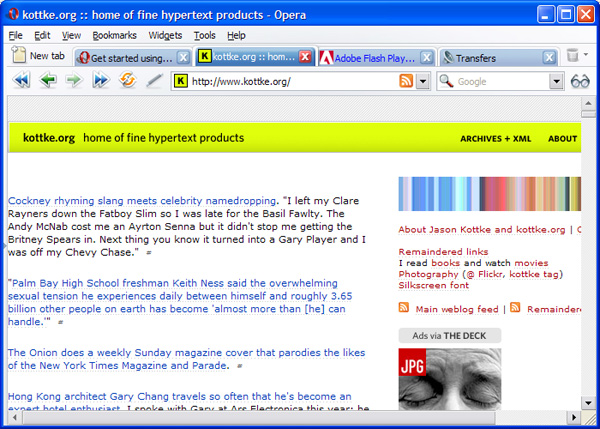
The good:
- Opera has the correct UI hierarchy for tabs – they appear above the address bar, as conceptually the tab is the highest order UI element in any browser (I complained about this in my first review of Firefox). To take this all the way, tabs should be above the menus too, but there are some problems with following the model this far.
- The notes & links sidebars rock. I’m a sucker for good sidebars as I designed them for IE4 & IE5 when they were new (and I was young). Everybody else has stood pat, but the notes field says “hey, I know you need scrap paper” and the links field says “Dude, relax. Here’s an easier way to use this page as a launching pad to other sites”.
- Tight, lightweight, clean visuals. I never thought I’d see the day, but Opera has a cleaner visual design than IE. It’s not even close. They handle the new tab usability issue gracefully (no birth defect button).
- Lots of unique clever goodness. The ability to start where you left off, save sessions (your suite of tabs), undo close page (Holy shit!), hotclicking and more. These are mostly done well and at worst give you the vibe of thoughtfulness: these Opera guys have clearly thought about what’s annoying in the browsing experience and tried to fix it.
The bad:
- Shortcut keys – if you’re a market trailer, you must support the shortcut keys for the market leaders. No questions. It’s easy to implement, at least as an optional mode. Most frustrating: Cntr-H, which is history in IE and FF, closes Opera! Pressing Alt-D (Address-bar), my most used shortcut, resulted only in misery.
- Active tab confusion: its hard to tell which tab is active. There’s not enough de-emphasis of non-active tabs, and the active tab needs stronger outline in connection to the browser frame (FF does this well).
- Help! I couldn’t figure out some of their unique features, so plunged into help for an overview. Searches for “wand” & “transfers”, two labels for features in their UI, turned up nothing. I don’t expect much from help, but with the web and wikis, I expect basic coverage of anything in the UI. (Transfers = Download manager as I eventually figured out on my own). There was a welcome to Opera first run page, but I couldn’t figure out how to get back to it (Why isn’t it listed in the help menu?)
- Vestigial weird UI. My old complaint about Opera was that it tried too hard: too many features designed in well intentioned, but awkward, goofy ways. 9.02 is much improved in this respect, but there are still some weird spots. The find on page UI is all too happy to highlight every instance of the first letter you type (shocking), and then switches to selecting the first, and highlighting the rest (I couldn’t figure out why: first instance is enough 95% of the time). There are some other oddities like this (print preview is a mode, not a separate view, the scrollbar has a bright yellow mouseover effect), but fewer than previous Opera experiences.
In summary, Opera is sweet! (Download here) I preferred it over IE7 for its personality and moxie alone, but until they soften a few more rough edges, I’m staying with FF.
So, what’s so wrong with the Undo Closed Tabs in FF that it doesn’t get the ‘holy shit’ treatment?
Two reasons: I discovered the feature first in Opera (Sorry, but there’s no easy way as a reviewer to know who claims to have done what first). But mostly because Opera has the UI right – Ctrl-Z, not a one-off menu command.
Opera has been my browser of choice for 7 years, and it always has an edge over the others. It sad to see copycats taking market shares, while Opera goes nowhere.
Hi Yawl: You should check out this thread on good innovations that lost.
One of the topics that comes up is the divergence between products with better attributes and ones that sell well or lead markets.
And btw: I can tell you that there are many features in Opera that were first shipped in Netscape & IE. Who cares. The notion of copycats isn’t interesting as far as product design goes (Do you remember what car manufacturer had the first anti-lock brakes?): it’s who is able to apply and combine ideas in the best way, not who did them first.
You’re “spot on” about “who did it first”. Those are the things that do not interest real people — only IP lawyers (remember the look-and-feel suits of years ago?).
There’s a *lot* to like in Opera. You might be able to satisfy your desire to have the active tab more emphatically indicated by choosing a skin (or you might not!). It’s never really bothered me.
I believe you can reset some (all?) of the hotkeys — but you’ve nailed it again: when you’re the market follower, you use the *standard* hotkeys!
Help is always an issue. Since Opera is available on numerous platforms, the help has to be portable. This was particularly important when Windows had .HLP and compiled Help files and others used different approaches. Now that everyone (mostly) is using web pages, the help in Opera needs to be deeper, more “standard” — well, they’re the market follower and they should provide the depth within the standard “mindset” that already exists.
As you get more and more into Opera, you will find that this is not going to be easy. Opera has a phenomenally rich environment (built-in: mail, newsgroups, RSS, torrents, … ) and developing any help system is going to be an almost overwhelming task given the breadth of functionality it must support.
I am quite happy with Opera (browser of choice) and yet I, too, could add lots of items to your list: some items just don’t work *right* (as a follower they … well, you get the idea); other items need a full release of enhancements so that they provide the functionality that should be there.
Some time ago, Opera asked its users to describe what improvements ought to be in the next full release. The last time I looked at the thread, they had enough work for five releases! But that’s okay: they’ve got Acid2 fully implemented and every other browser is playing catchup to that one. In short: every browser has its shortfalls — Opera just has fewer of them ;-)
re ctrl-Z to undo close tab: download “keyconfig” and configure undo close tab to use ctrl-z (I use ctrl-shift-Z quite happily).
agreed that the default key is not great, but I don’t think undo close tab is a horrible choice for a one-off menu actually. It’s great when it’s needed, but not really an incredibly common thing. Though I do find I use it about 5 times a day.
Leo: I mostly agree. But there’s a conceptual simplicity in reusing Cntrl-Z for any kind of undo.
(Of course anyone that’s thought about OS design, knows there are some problems with a truly universal undo, as it gets hard to guess at exactly what people expect Undo to do in certain situations, but that’s not really relevant here so I’ll shut up now.)
Yeah, I agree that it is better in Opera. I think that in FF, it came from the TabMixPlus add-on, which used to have two entries in the context menu; one for undo closed tab, and another with a list of recently closed tabs.
Unfortunately, they only sort of took half of the functionality, I used to use it a lot (so much so that I used to try to use it when I accidentally closed a windows explorer window!); but now that it’s not on the context menu, I don’t use it.
However, a version TabMixPlus has just been released that works with FF2, so I have my old favourite back – man, I just love add-ons….
Fortunately you can fix all those problems on ‘the bad’ list! (I know – it should be OK by default)
– Tools -> Preferences -> Advanced -> Shortcuts
and you can change shortcuts to suit your needs. my.opera.com has some downloadable presets if you don’t like to config them yourself.
– Tools -> Appearance -> Skins
and choose one that has better tabs and less other quirks (again – lots of options on my.opera.com)
As for highlight – highlighting first letter is dumb, but personally I like that it highlights every instance of the word you’re looking for – it’s all there and you don’t have to keep hitting F3. Opera 9.1 (currently beta) makes highlight configurable.
Personally I love Opera 9, I was blown away by some of the cool features and everything is just so smoooooth. I think it is the best browser available currently… in a technical sense.
However for some reason I have always felt an emotional tie to Firefox, even from when it was Phoenix. Maybe it’s the cute logo and name. Who knows; but I do know that one of the main things that annoys me with Opera is the shortcuts, and things like the print preview opening in the same tab as the web page, whereas every other browser and application opens it in a new window.
Great review though – thanks!
Rachel: yup – I noticed the “everything tabs all the time” behavior too. It’s a great example of how tough it is to make new UI models – how consistent should you be?
They’ve very consistent and put everything into tabs, probably arguing that it’s simpler if everything has the same behavior. But sometimes being sloppy is actually easier for people to follow and use. A preview is something needed just for a moment, and it’s worthy of a pop-up or separate window.
By placing it in the tab they force all of the tab conventions and overhead that are rarely needed when just previewing before printing.
I’ve been using Opera since version 3 and it is always annoying that it is rarely credited for it’s innovations. The rendering engine still seems faster than the competition and it continues to lead in many areas.
Opera has adopted some of the hotkeys used by other browsers (eg. the Ctrl-T for new tab).
It’s a real shame some of the other browsers can’t use some of opera’s hotkeys – the z and x hotkeys for next/previous page are really useful and well thought out (z is much better than backspace which is used by other browsers).
Funny thing is I’ve never heard of the alt-d shortcut, I’ve always used ctrl-L which works in Opera and FF. IE6 frustrates me for not doing the same thing! :)
I think a key advantage of Opera over FF is the way it has cool features built in as standard. Most FF zealots rely on *extensions* to provide the killer functionality. While extensions are indeed cool, there is nothing to say they’ll function beyond the next dot-point update of FF. The person who made it may not have the time or inclination to update their extension again and all of a sudden, you’re back to square one. With Opera that’s less likely, since the person who made the feature either still works for the company or someone new was hired to take their place.
My frustrations with Opera aren’t so much the features as the initial configuration – the toolbars out of the box aren’t intuitive enough for transitioning users. Since people fear change anyway, that makes it likely that Opera will get all of 30 seconds before the user goes back to IE. Which is a pity all ’round :)
I actually created a configuration guide for Opera 8 which pretty much still stands – http://weblog.200ok.com.au/2005/09/configuring-and-using-opera-8.html which really didn’t need an update when 9 came out (http://weblog.200ok.com.au/2006/06/opera-9-released.html).
> Ctrl+H … closes Opera
Hmm. Not close, but hide in tray.
I found that, Opera 9.02 browser works slowly compared to any other browser. Isn’t it?
I loved FF (Phoenix) for years until my old pc couldn’t keep up with the upgrades. It seemed that FF ran less smoothly (for my old pc) every time they upgraded. I tried Opera when they gave it away free for 1 day, on their 10th anniversary. It was a bit of a struggle to relearn it, but not awful.
I was pleased when Opera added ‘custom searches’ because I missed that the most after switching. I am still missing how easy FF’s plugins were to install vs having to config stuff in Opera (which I’m still not very good at, and have to go to their chat for help).
As far as focused tabs, it seems that depends on the skin designer. Here’s a screenshot of some of my skins with your site’s tab in focus. I like the bottom one the most, and the one above it would be nice, except I think it’s backwards (but DH likes that one). http://i17.tinypic.com/2hz2vwm.png
Hi,
After using Opera for over 4 Years now. It’s the only browser that covers all my needs. But I still remember when I first started using it people didn’t like it and asked why I would use such a crap browser. It was fully customisable and it was fast (so I was told by a PC mag test). But all in all I think it’s a bit harsh to pick at opera, as I don’t think that it’s for the masses. It’s for people that are able to work it out with out the help guide oh if that fails they can use google and find how to use a feature. But I think Opera is something that grows on you.
I just want to ask, how to accelerate your Opera 9.02 10X faster… Because in Mozilla Firefox 2.0 it config the network…
i noticed a nice opera review in this site http://www.browsers-review.com
i think their favourite browser is mozilla firefox as many people do. bye
Great to see you coming to the other side (even if only occassionally).
I find the tabs just as difficult to discern whether active in Firefox as in Opera. It’s something they could both improve upon. I think Opera has the style correct, simply not enough emphasis.
Ctrl-h in Opera (prior to 9.5) hides Opera to the system tray (similar to cmd-h on the Mac). I am a little disappointed that they will be conforming ctrl-h to bring up the History panel (especially since I use a mouse click to access my panels).
I was very much opposed to Opera conforming ctrl-t to opening a new tab. They introduced tabbed browsing. Tabs were native to Opera. It made perfect sense to have ctrl-n open a new tab. Why would anyone ever want a new window? But now it’s ctrl-t. Bummer.
So it goes.
I too love the Notes panel. I use it constantly.
And I could not agree more about the closed tab thing. You forgot to mention the little trashcan that sits to the right of the tab bar. That’s a great sort of quick history as well as being the repository for closed tabs.
I am told that in 9.5 it will house closed windows as well–though I have not yet tested for this functionality.
If you haven’t looked at 9.5 yet (still in Beta) you ought to. It’s going to include roaming bookmarks and profile elements.