
The art of usability benchmarking
By Scott Berkun, October 2003
 Benchmark: A standard by which something can be measured or judged
One common concern raised by managers and engineers alike is how easy to use is enough? The smart designer has at least one response: the usability benchmark. By capturing the current level of ease of use of the current product or website, a reference point is created that can be measured against in the future. It doesn’t answer the question of how usable is enough, but if the benchmark is done properly, it does enable someone to set goals and expectations around ease of use for the future.
How benchmark studies differ from other kinds of usability studies
Most user studies focus on discovering confusing things, and understanding why people get confused. A benchmark study doesn’t care about why: it’s a raw measure of user performance. Unlike most usability methods, benchmark studies more closely resemble true experimental psychology lab studies, with greater attention to detail on methodology, study protocol and data analysis. Since the claims you want to be able to make about the data will be stronger, the methodology and approach you use should be stronger as well.
So in a benchmark study, you would never ask participants in the study to use what’s called verbal protocol during the study. Verbal protocol is a way to try and understand what users are thinking while they are performing tasks. Verbal protocol has negative impacts on many measurable user performance metrics, such as time to complete tasks. People process information slower if they are asked to perform verbal protocol at the same time, and therefore it negates the intentions of a true benchmark study.
Know why you’re doing it
Before you invest in any usability study, benchmark or otherwise, you must understand the organizational perspective on why you are doing it. Is the study being done to satisfy someone’s curiosity? To enable an executive to say “we care about users”? Or less cynically, is it to enable the developers to make better product decisions? Benchmark studies demand even more clarity because they are a long term investment. It takes more time and effort to run. A benchmark study will not have immediate value to a specific new feature or project milestone. Instead, it will help provide a framework that will pay off in every other study you run in the future.
When to run benchmark studies
If you’re working on the web, you want to pick a set date where the design live on the web will be most stable, or can be documented for reference later. Often it makes sense to time this after either a major set of new design changes, or at a point when the site will be the most stable (both in the sense of the design and the engineering reliability of the website itself) for an extended period of time. This is because for a benchmark to be valuable, everyone has to use the same version of the site. understand the point in time when the benchmark was done. This may mean preserving a version of the software or website so others can examine it a year or more into the future (screenshots can often be sufficient).
Another important consideration for timing of benchmark studies is the planning of the next major release or update to the design. You want to make sure that the benchmark data will be ready in time to have a major impact on any future planning efforts. In some cases, a well timed benchmark study can be the catalyst for focusing the next major effort on design and ease of use, if it’s conducted properly and illustrates areas that need major improvements.
How to pick core tasks
A task, in common usability lingo, is a rough measure for a user activity. Each task is a discrete activity that a customer would want to perform with a website or product, and preferably, is defined in customer language. If you were the usability engineer for a word processor, here are some of the user tasks you’d be thinking about: creating a new document, typing a letter, spell checking a document, printing a document. Some tasks might be larger than others, and it’s up to the usability engineer and the team to determine what level of granularity is appropriate.
A core task is a customer activity with your product or website that is important, either because it is done frequently or for other reasons (e.g. registration or setup, where it’s something every user has to do once). Typically, every developer or manager wants the area of the design that they are responsible for to be a core task. Therefore, you don’t want to rely solely on opinions to define what makes the cut.
Instead, the list of core tasks should be based on your assessment of all of the different sources of customer information you have at your disposal. From web data logs, to focus groups, to cognitive walkthroughs, you should pull from several different data sources to generate your list. Each source of data (if you’re fortunate enough to have multiple data sources) has its own biases, and might even come from different departments within your organization.
You should also consider how the flow of user behavior cuts across tasks. It may turn out that a task is unimportant on its own, but because it is performed as a transition between two important tasks, it should also be considered important. Review your list of tasks carefully, and build an ordered list of the tasks you think might be worthy of benchmarking. (In an average 2 hour usability participant session, expect to fit 10-15 tasks, depending on their complexity, and if your study design requires multiple attempts at the same type of task. For convenience sake, it’s common to pick 10 core tasks, and focus on them for benchmarking and other high level analysis).
These core tasks are important beyond the benchmark study itself. If you define them carefully, and get the team to see them as accurate reflection of the important things customers are actually doing wit the product, they should have a focusing effect, and drive decisions beyond the UI design. It will help the team make better decisions about other technological investments, since everyone will know which improvements will be experienced most often by customers.
It will also enable you to make easier decisions about future usability studies, since you’ll know which areas deserve more time in the lab. Whenever new features or plans are suggested, people will be able to ask “which core user tasks will this new feature improve?” If the answer is none of them, then the idea should probably be dropped, or research found to support revising the core tasks. Politics may ensue around the core tasks, but if you had buy in for how the core tasks were defined, you should be able to make a strong defense. On the best teams, the core user tasks are one of the places to start idea generation activities from, instead of just a checkpoint at the end.
(Note: You should be aware that the word “task” is often used again in usability studies, with a different meaning, to describe something a participant is asked to do in a study (e.g. the task list & instructions that they are given during the study).
What do you measure?
Most benchmark studies center on the basic usability study measurements:
- Success/Failure within a time threshold
- Time on task
- # of errors before completion
For most web or software interfaces, for most people, a surprisingly large percentage of people will fail to complete some of the core tasks. This is often a shock to managers and engineers, who tend to assume that most people can eventually do everything the product or website offers. From the benchmark studies I’ve run, or have had run on things I’ve designed, the success/fail numbers have been the most interesting.
How to set usability goals for benchmark studies
If it’s the first usability study for a given team or design, the goals will be arbitrary. This is ok – all benchmarks for anything in the universe start this way. Just ask the engineering or test team how they defined their performance (load time, query time, etc.) goals for their database architecture and you’ll get one of two answers: 1) Our goal was to be X% better than last release or 2) We made them up. This doesn’t mean that usability or other goals are irrelevant or dismissible. It just means that the work involved is complex and no formula exists for defining an appropriate level of improvement. Someone has to go and put a stake in the ground, and it might just need to be you.
(One sneaky way around this problem is to perform usability benchmarks on competitor’s products, and use that as a baseline. So the usability goals could be this: Be 10% better than Brand X).
Typical goals should look something like this:
Task: Complete a purchase of 3 (or more) items from the shopping cart page.
Goal: 75% of all participants will be able to complete this task within 3 minutes
Fancier goals can include different sub-goals for novice, intermediate or advanced users (as defined by the usability engineer) or detailed goals for errors or mistakes. If it’s the first time you or your organization are doing this, I recommend keeping it as simple as possible. This helps focus everyone’s attention and makes it easy for people to know how well things are going. You might decide to collect more data than specified in the goals (for potential use for v2 when the goals are more advanced), but don’t set goals on it, or even report this data to the team. Keep yourself and your team focused.
In some organizations the developer or manager responsible for each feature area is responsible for setting usability goals for their areas. The usability engineer, if there is one, assists and guides the process, but the individual must come up with the final numbers themselves. This is preferable: it gives them some skin in the game and a vested interested in the process. If you have to go and set the usability goals for them, they can always blame you later for making them unrealistic, or simply ignore the process altogether. This is bad.
On one team, I spent a great deal of time debating the time on task goals they wanted to set. They were bought into the usability and benchmarking process, but struggled with the specifics of setting numbers. I think part of it was fear around making specific targets for usability, and part of it was a lack of experience with how much time it actually takes people to do things. So here’s what we did: I timed how long it took the engineers themselves to do the task. This was fun, broke the ice, and gave us numbers that we all knew were at the extreme low end, since no customer would ever perform better than what they did.
With these numbers in place, the engineers had a number to speculate against, which helped dramatically. Most of the goals they came up with were at least 5 or 6 times higher than the engineer’s performance, and the team collectively felt the goals they were setting were reasonable. (Turned out they were still way off, since the average performance was on the order or 10 to 12 times slower, for most trials where participants actually completed the tasks). Again, never fear goals as an end to people caring about usability – engineers and managers tend to optimists regarding their own work, and will generally underestimate how hard designs are to use).
Usability goals can be important for other reasons: often the absence of usability goals are a key reason why ease of use efforts never get very far.
How to promote and evangelize usability benchmark efforts
You should invest in some system of publicity and rewards for those that are involved in the benchmark. For this to be effective, you must know who your sponsors and supporters are. Is it a senior manager? The engineers? The team leaders? Identify them early and ask for their help in promoting the work, and get them involved in both defining and evangelizing the effort. You should guide this process, but they should participate and offer their voice and support.
Like any other team metric, usability goals provide an opportunity for teams to evaluate their performance, and rally around work that they are all involved in. The most common (successful) thing I’ve seen is to have 3 steps in the process.
- Two weeks before the study, present to the larger organization. What is a usability benchmark? When will it occur? How will the results be used? How can people participate? (Invite people to come and watch, but give them rules) Take advantage of your sponsors and supporters. Speak at their meetings, or ask them to send out the email announcements for you.
- During the study, have a board posted in a visible place in the hallway. List the goals set by the team, and the results from the previous day or from the last participant. This might mean you can only show time on task, and success/fail, but that’s ok. Don’t show the summary or totals – save that for your post study presentation.
- As soon as possible after the study, hold another presentation. The longer you wait, the more power people’s uniformed assumptions will have about what they observed. Present a top level summary of the results, key findings, and next steps. Don’t run more that 10 or 15 minutes – you should’t need it. Avoid talking in detail about methodology unless people ask (but do be prepared for it). In larger organizations, consider a smaller meeting with the goal setters prior to this larger meeting – it’s an act of respect for them, and puts them in a position to manage any politics that might arise based on the results.
If done properly, this kind of promotion of benchmarking activities can make all of your user centered design efforts more visible in a positive way. This might be the catalyst to more funding, better attendance at studies, and more opportunities for your involvement in a strategic, rather than tactical, way.
Reporting data
One common trap of benchmark studies is the scope and complexity of the data you end up with when you’re done. If you’re not careful, you can fall victim to data weenie syndrome, and create charts and tables with all sorts of information no one cares about but you (or your statistics professor). To avoid this, I recommend focusing entirely on the goals. This is what managers and engineers will care most about, and have the greatest response to. Everyone will understand what it means if only 10% of participants met all of the usability goals.
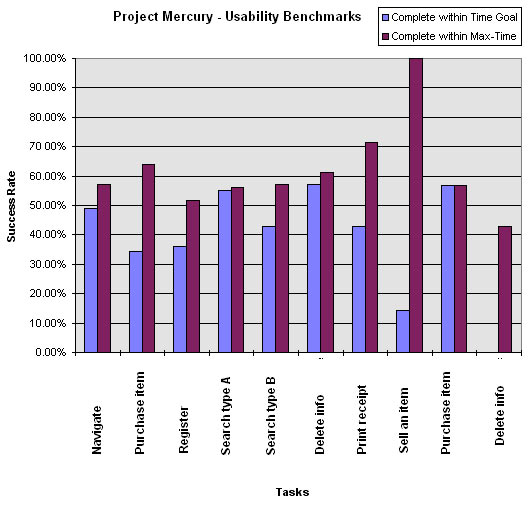
In any reports or graphs that you publish, lead with the goals, and a simple representation of what percentage succeeded or failed for that goal. A good example of this kind of chart is shown below: you can see the list of core tasks that were part of the study, and what percentage of people met the goal, and what percentage were able to complete the task at all. Another common graph is one that shows the average time on task for participants vs. the set goals. The problem with this kind of chart however is that it can’t easily represent how many participants did not complete the task at all – which is often more important information than the times of those that did.
Other tips and things to consider:
- Keep your raw data. You may add a new core task for the next benchmark, or a set a new usability goal, and there is an outside chance you’ll have captured the kind of data you need. Don’t work too hard on this, but if you can, zip up those raw notes or data log files from your VHS viewing tool, and label them correctly. Remember that it might not be you that has to dig through them later.
- Brush up on sample size and parametrics. If it’s your first benchmark study, it’s a good time to refer back to your experimental psychology textbook, and look up study design. There was likely a chapter about basic statistics for studies, and the relative strengths of confidence you can make given different sample sizes.
- It’s usually worth doing multiple trials for each core task. This means that your study asks participants to attempt the same type of task twice. There are two good reasons for this. First in strengthens your benchmark data, because you can report the average performance of two attempts at the same type of task, instead of one. Second, you can now examine learning costs and see if there are trends for improved performance after the first attempt. You might find, for example, that while 50% of participants failed to print a document (a core task) on the first attempt, 75% were able to do it the second time they tried.
- The first benchmark study you run for an organization will be the hardest. After you’ve done it once, they’ll understand how it works, how it’s different from other studies, and why it’s important. Keep this in mind. Every time someone asks you a question about benchmarking, you have an opportunity to build more support behind it, so respect the questions. If possible, investigate other benchmarking efforts on other teams, such as test/QA or the engineering team. There might be vocabulary or precedence you can take advantage of.
- Make sure your report has at least one screenshot for each core task. I said this before, but it’s worth repeating. Designs change from version to version, and if you don’t document it, it will be difficult for people to assess why things may have gotten better or worse over time. This is true for all usability studies, but even more important for benchmarks (a usability report without a screenshot is like a gun without bullets: not effective). In some cases, you may have people who are not familiar with parts of the design, and a screenshot is a quick reference.
- Pave the way for you data – Talk to your team. It might be worth the time to generate a sample chart, before you do the study, of what the actual results will look like. Show this to a few people on the team, and see if they understand what it means. There might be some ways to adjust both the kind of data you collect, and the way you present it, before you ever set foot in the lab. You could even use the chart above for this purpose.
10 Responses to “The art of usability benchmarking”
Pingbacks
[…] in numbers (for example see here: Measuring Usability and a paper about Single Usability Metric or Usability Benchmarking or the work of Nigel Bevan and this great thread) This might solve the problem of measuring how […]
[…] also want to understand where you stand in the marketplace, review your positioning, benchmark your products and services, and compare them against the competition.
[…] also want to understand where you stand in the marketplace, review your positioning,
[…] ^ The art of usability benchmarking […]
[…] In an essay on his website, bestselling author and speaker Scott Berkun points out that, while other usability tests focus on specific aspects, the usability benchmark test measures only user performance without regard to the why. In fact, participants should even be discouraged from explaining their thoughts, as explanations would impact the time and focus spent interacting with the product. […]
[…] up^ “#27 – The art of usability benchmarking”. Scottberkun.com. 2010-04-16. Retrieved […]
[…] Scott. “The Art of Usability Benchmarking.” Scottberkun.com, October 2003. Retrieved January 30, […]
[…] Reference (scottberkun.com) […]
[…] Reference (scottberkun.com) […]
[…] Reference (scottberkun.com) […]